딥러닝 모델을 학습시키고 사용한 가중치와 편향들은 학습이 끝난 뒤 메모리에 있는 학습결과가 사라진다. 이 값들을 파일로 저장한것이 모델저장. 저장하징낳으면 다음날 다시 5시간동안 학습해야하기때문에 비효율적이지않은가.!
이 기존 모델을 불러온 뒤 새로운 데이터로 다시 학습하는것을 재학습 Fine Tuning 이라고 한다.
학습한 모델을 웹 서버에 올려 실제 사용자가 사용할 수 있게 하는것을 웹서비스 배포라고 한다.
import torch
import torch.nn as nn

# 간단한 모델
model = nn.Sequential(
    nn.Linear(10, 5),
    nn.ReLU(),
    nn.Linear(5, 1)
)

# 학습이 끝났다고 가정
# ...

# 모델 가중치 저장
torch.save(model.state_dict(), "model.pth")
print("모델 저장 완료")
import torch
import torch.nn as nn

model = nn.Sequential(
    nn.Linear(10, 5),
    nn.ReLU(),
    nn.Linear(5, 1)
)

# 저장된 가중치 로드
model.load_state_dict(torch.load("model.pth"))

# 추론 모드
model.eval()

print("모델 불러오기 완료")
#텐서플로우에서는 모델 전체를 저장 할 수 있다. model.save("model.keras")를 사용하면 모델구조, 가중치, 옵티마이저 상태를 모두 저장해 초보자 입장에서 편리하다 .
PyTorch도 모델 전체 저장이 가능하다. 공식적으로는 가중치만 저장하는 방식을 권장하게 되는데 파일크기가 작고 버전 호환성이 좋아 코드 수정에 유연하다는 장점이 있다.
하지만 state_dict를 더 많이 사용한다. 전체 모델 저장은 구조 클래스를 같이 저장하지않고 클래스 위치를 참고하며 이를 나중에 수정하려한다면 에러가 난다. state_dict()는 단순히 숫자 데이터만 저장하니 훨씬 안전하다.
텐서플로우는 불러와 바로 사용이 가능하기 때문에 pytorch는 연구개발용으로 많이 사용하고 텐서플로우는 배포용으로 많이 쓰인다.
import tensorflow as tf

# 모델 전체 저장
model.save("model.keras")

# 모델 전체 불러오기
loaded_model = tf.keras.models.load_model("model.keras")
import torch
# 가중치 저장
torch.save(model.state_dict(), "model.pth")
# 동일한 구조의 모델 생성
model = MyModel()
# 가중치 불러오기
model.load_state_dict(torch.load("model.pth"))
model.eval()
실제현업에서는 model.pth, model.keras파일로
데이터 전처리 정보, 클래스정보, 학습 설정 정보를 저장한다.
샘플코드 model_save_usage 파일을 분석해보자 .
입력값 x와 정답값y를 생성하고 nn.Module을 받아 init 및 forward를 수행한다. 이 데이터를 linear(x) 간단한 선형 계층에 통과시켜 예측값을 생성한다.
nn.MSELoss 평균제곱오차 손실함수를 사용하고 제일 기본적인 optim.SGD 로 최적화알고리즘을 사용한다.
epoch만큼 모델을 학습하고 criterion(pred, y)로손실을 계산해 optimizer.zero_grad() 기울기를 초기화하고 loss.backward() 역전파로 기울기를 계산해 optimizer.step() 가중치와 편향을 업데이트한다.
이 학습된 모델을 torch.save() 하는데 nodel.state_dict() 값들만, pytorch_model.pth 파일로 저장한다.
# PyTorch 딥러닝 모델 저장 및 불러오기 예제

import torch
import torch.nn as nn
import torch.optim as optim

# 입력 데이터와 정답 데이터 생성
# X는 입력값, y는 정답값이다.
X = torch.tensor([[1.0], [2.0], [3.0], [4.0]])
y = torch.tensor([[2.0], [4.0], [6.0], [8.0]])

# 간단한 선형 회귀 모델 클래스 정의
class SimpleModel(nn.Module):
    def __init__(self):
        super().__init__()

        # 입력 1개를 받아 출력 1개를 만드는 선형 계층
        self.linear = nn.Linear(1, 1)
    def forward(self, x):
        # 입력 데이터를 선형 계층에 통과시켜 예측값 생성
        return self.linear(x)

# 모델 객체 생성
model = SimpleModel()

# 평균제곱오차 손실함수 사용
criterion = nn.MSELoss()

# SGD 최적화 알고리즘 사용
optimizer = optim.SGD(model.parameters(), lr=0.01)

# 모델 학습
for epoch in range(1000):
# 모델 예측
    pred = model(X)

    # 예측값과 정답값의 차이를 손실로 계산
    loss = criterion(pred, y)

    # 이전 기울기 초기화
    optimizer.zero_grad()

    # 역전파로 기울기 계산
    loss.backward()

    # 가중치와 편향 업데이트
    optimizer.step()

# 학습된 모델의 가중치 저장
torch.save(model.state_dict(), "pytorch_model.pth")
해당 contents/는 colab이 재시작되면 사라지는 파일이다 .
drive.mount()해 shutil.copy()로 해당 파일을 다운로드해 저장해보자 .
import os
torch.save(model.state_dict(), "pytorch_model.pth")
print("현재 폴더:", os.getcwd())
print("절대경로:", os.path.abspath("pytorch_model.pth"))
print("파일 존재 여부:", os.path.exists("pytorch_model.pth"))


from google.colab import drive
drive.mount('/content/drive')

import shutil
shutil.copy(
    "/content/pytorch_model.pth",
    "/content/drive/MyDrive/data/pytorch_model.pth"
)
!ls -lh /content/drive/MyDrive/pytorch_model.pth
모델을 가져다 쓸때는 모델구조와 동일하게 정의해야하고,
빈 모델 객체를 생성해 파일을 불러와 .eval()예측모드로 변경해 new.data를 활용해 기울기계산없이 예측을 수행한다.
# 저장된 PyTorch 모델 불러오기 및 예측

import torch
import torch.nn as nn

# 저장할 때 사용했던 모델 구조와 동일하게 정의
class SimpleModel(nn.Module):
    def __init__(self):
        super().__init__()
        self.linear = nn.Linear(1, 1)

    def forward(self, x):
        return self.linear(x)

# 빈 모델 객체 생성
loaded_model = SimpleModel()

# 저장된 가중치 불러오기
loaded_model.load_state_dict(torch.load("pytorch_model.pth", weights_only=True))

# 예측 모드로 변경
# Dropout, BatchNorm 등이 있을 때 학습 모드와 예측 모드를 구분하기 위해 필요하다.
loaded_model.eval()

# 새로운 입력 데이터
new_data = torch.tensor([[5.0]])

# 기울기 계산 없이 예측 수행
with torch.no_grad():
    result = loaded_model(new_data)

print("예측 결과:", result.item())
tensorflow로 수행해보자.
tensorflow를 import해 마찬가지로 입력데이터와 정답 데이터를 생성하고, tf.keras.sequential 모델을 생성해
tf.keras.layers.Dense(1, input_shape(1, ))로 출력값 1개를 만드는 Dense 계층을 만들자.
model.compile() 이후 tf.keras.optimizers.SGD() 가중치를 업데이트하는법, loss 오차 계산방법을 저장하고 model.fit()
학습시켜
mode.save()한다.
Tensorflow는 모델 구조 가중치 옵티마이저 상태등을 모두 저장해 모델구조를 만들징낳고 불러와 데이터만 입력해 끝내는것을 확인한다. 학습코드또한 model.fit()코드 한줄로 모두 끝났다.
PyTorch는 compile단계가 없어 criterion과 optimizer를 따로따로 만들어 직접 호출했으나 tensorflow는 model.compile안에서 함께 정의해 보내는것을 확인 할 수 있다.
Dense는 완전 연결층, FC Layer로 입력1개를 받아 출력 1개를 만드는 신경망 층이다 .
# TensorFlow 딥러닝 모델 저장 예제

import tensorflow as tf
import numpy as np

# 입력 데이터와 정답 데이터 생성
X = np.array([[1.0], [2.0], [3.0], [4.0]])
y = np.array([[2.0], [4.0], [6.0], [8.0]])

# 간단한 Sequential 모델 생성
model = tf.keras.Sequential([
# 입력값 1개를 받아 출력값 1개를 만드는 Dense 계층
tf.keras.layers.Dense(1, input_shape=(1,))
])

# 모델 컴파일
# optimizer는 가중치 업데이트 방법, loss는 오차 계산 방법이다.
model.compile(
optimizer=tf.keras.optimizers.SGD(learning_rate=0.01),
loss="mse"
)

# 모델 학습
model.fit(X, y, epochs=1000, verbose=0)

# 모델 전체 저장
model.save("tensorflow_model.keras")
print("TensorFlow 모델 저장 완료")
이후 tf.keras.models.load_model()파일을 불러와 새로운 입력데이터를 통해 예측을 수행하면 바로 결과가 나오는것을 볼 수 있다
import tensorflow as tf
import numpy as np

# 저장된 모델 불러오기
loaded_model = tf.keras.models.load_model("tensorflow_model.keras")

# 새로운 입력 데이터
new_data = np.array([[5.0]])

# 예측 수행
result = loaded_model.predict(new_data)

print("예측 결과:", result[0][0])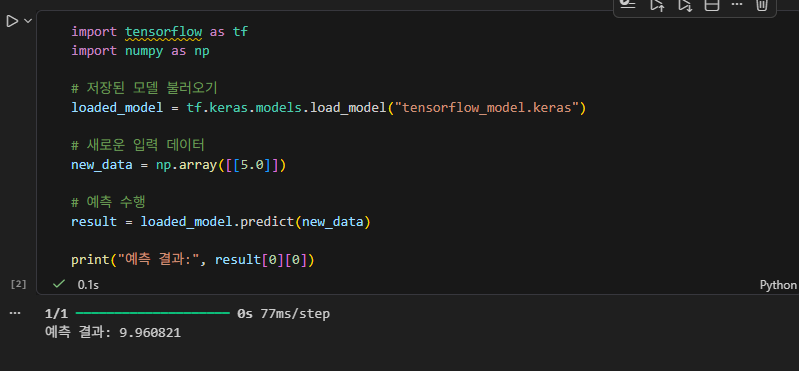
backpropagation_pytorch 샘플코드를 분석해보자.
import, 시드고정
# ============================================================
# 1. PyTorch 라이브러리 불러오기
# ============================================================

# torch는 텐서 계산, 자동 미분, 딥러닝 모델 학습을 위한 핵심 라이브러리입니다.
import torch

# torch.nn은 신경망 계층, 손실함수 등을 제공하는 모듈입니다.
import torch.nn as nn

# torch.optim은 SGD, Adam 같은 최적화 알고리즘을 제공하는 모듈입니다.
import torch.optim as optim

# matplotlib은 손실값 변화를 그래프로 확인하기 위해 사용합니다.
import matplotlib.pyplot as plt

# 실행 환경에 설치된 PyTorch 버전을 출력합니다.
print("PyTorch version:", torch.__version__)

# ============================================================
# 2. 재현성을 위한 시드 고정
# ============================================================

# 딥러닝은 가중치 초기화 등에서 무작위성이 사용됩니다.
# manual_seed를 설정하면 같은 코드를 반복 실행할 때 비슷한 결과를 얻을 수 있습니다.
torch.manual_seed(42)
입력값 x, 정답, 가중치를 tensor로 생성하자.
prediction = 입력값과 가중치를 곱해 예측값을 계산하고 제곱해 loss를 구한다 .
# ============================================================
# 3. 단순 계산식 예제
# ============================================================

# 입력값 x를 텐서로 생성합니다.
x = torch.tensor(2.0)

# 모델이 맞혀야 하는 정답값을 텐서로 생성합니다.
target = torch.tensor(10.0)

# 가중치 w를 텐서로 생성합니다.
# requires_grad=True는 w에 대해 기울기를 계산하겠다는 의미입니다.
w = torch.tensor(3.0, requires_grad=True)

# 순전파: 입력값 x와 가중치 w를 곱해 예측값을 계산합니다.
prediction = x * w

# 손실 계산: 정답과 예측값의 차이를 제곱합니다.
loss = (target - prediction) ** 2

# 현재 계산 결과를 출력합니다.
print("입력값 x:", x.item())
print("초기 가중치 w:", w.item())
print("예측값:", prediction.item())
print("정답값:", target.item())
print("손실값:", loss.item())
loss.backward로 기울기를 계산한다.
learning_rate와 함께 기울기를 수정한다.
zero_() 기울기초기화해 재확인해보자.
# ============================================================
# 4. backward()로 기울기 계산
# ============================================================

# loss.backward()는 손실값에서 시작하여 역방향으로 미분을 수행합니다.
# 이 과정이 PyTorch에서 오차역전파에 해당합니다.
loss.backward()

# w.grad에는 손실값을 w로 미분한 기울기가 저장됩니다.
# 이 값은 w를 어느 방향으로 수정해야 손실이 줄어드는지 알려줍니다.
print("w에 대한 기울기:", w.grad.item())
# ============================================================
# 5. 기울기를 사용해 가중치 직접 수정
# ============================================================
# 학습률은 가중치를 한 번에 얼마나 수정할지 결정합니다.
learning_rate = 0.01
# 가중치 업데이트는 기울기 추적이 필요 없으므로 no_grad 안에서 수행합니다.
with torch.no_grad():
# 경사하강법 공식: 새 가중치 = 기존 가중치 - 학습률 * 기울기
w -= learning_rate * w.grad
# 수정된 가중치를 출력합니다.
print("수정 후 가중치 w:", w.item())
# PyTorch는 기울기를 누적하므로 다음 계산 전에 반드시 0으로 초기화해야 합니다.
w.grad.zero_()
# 초기화된 기울기를 확인합니다.
print("초기화 후 w.grad:", w.grad.item())
반복 학습하며 손실값을 기록해 출력한다 .
# ============================================================
# 6. 단일 가중치 반복 학습
# ============================================================

# 학습 대상 가중치를 다시 초기화합니다.
w = torch.tensor(3.0, requires_grad=True)

# 입력값과 정답값을 설정합니다.
x = torch.tensor(2.0)
target = torch.tensor(10.0)

# 학습률을 설정합니다.
learning_rate = 0.05

# 손실값을 저장할 리스트입니다.
loss_history = []

# 30번 반복 학습합니다.
for epoch in range(30):
    # 순전파: 현재 가중치로 예측값을 계산합니다.
    prediction = x * w

    # 손실 계산: 예측값과 정답값의 차이를 제곱합니다.
    loss = (target - prediction) ** 2

    # 손실값을 기록합니다.
    loss_history.append(loss.item())

    # 이전 기울기가 있으면 초기화합니다.
    if w.grad is not None:
        w.grad.zero_()

    # 역전파: 손실값을 기준으로 가중치의 기울기를 계산합니다.
    loss.backward()

    # 가중치 업데이트를 수행합니다.
    with torch.no_grad():
        w -= learning_rate * w.grad

    # 학습 과정을 출력합니다.
    print(f"epoch={epoch+1:02d}, w={w.item():.4f}, prediction={prediction.item():.4f}, loss={loss.item():.4f}")
위내용을 그래프로 출력한다 .
# ============================================================
# 7. 손실 감소 그래프 출력
# ============================================================

# 그래프 크기를 설정합니다.
plt.figure(figsize=(8, 5))

# 손실값 변화를 선 그래프로 표시합니다.
plt.plot(loss_history, marker="o")

# 그래프 제목을 설정합니다.
plt.title("Loss Decrease by Backpropagation")

# x축 이름을 설정합니다.
plt.xlabel("Epoch")

# y축 이름을 설정합니다.
plt.ylabel("Loss")

# 격자선을 표시합니다.
plt.grid(True)

# 그래프를 출력합니다.
plt.show()
다시해보자. x y값 지정
nn.Linear로 선형회귀 모델을 정의한다.
# ============================================================
# 8. 학습 데이터 준비
# ============================================================

# 입력 데이터입니다. shape은 (샘플 수, 입력 특성 수)입니다.
X = torch.tensor([[1.0], [2.0], [3.0], [4.0], [5.0]])

# 정답 데이터입니다. y = 2x + 1 규칙을 따릅니다.
y = torch.tensor([[3.0], [5.0], [7.0], [9.0], [11.0]])

# 데이터 형태를 확인합니다.
print("X shape:", X.shape)
print("y shape:", y.shape)

# ============================================================
# 9. 선형 회귀 모델 정의
# ============================================================

# nn.Module을 상속하여 사용자 정의 모델을 만듭니다.
class LinearRegressionModel(nn.Module):
    # 모델에 필요한 계층을 정의합니다.
    def __init__(self):
        # 부모 클래스 초기화입니다.
        super().__init__()

        # 입력 1개를 받아 출력 1개를 만드는 선형 계층입니다.
        # 내부적으로 y = xw + b 계산을 수행합니다.
        self.linear = nn.Linear(1, 1)

    # 순전파 과정을 정의합니다.
    def forward(self, x):
        # 입력 x를 선형 계층에 통과시킨 결과를 반환합니다.
        return self.linear(x)

# 모델 객체를 생성합니다.
model = LinearRegressionModel()

# 모델 구조를 출력합니다.
print(model)
nn.MSELoss() 손실함수설정, optimizer 최적화 알고리즘 설정 SGD 가장 기본적인. 계산된 기울기에 가중치를 조금씩 수정한다.
# ============================================================
# 10. 손실함수와 최적화 알고리즘 설정
# ============================================================

# MSELoss는 회귀 문제에서 예측값과 실제값의 차이를 제곱 평균으로 계산합니다.
criterion = nn.MSELoss()

# SGD는 계산된 기울기를 이용해 가중치를 조금씩 수정하는 최적화 알고리즘입니다.
optimizer = optim.SGD(model.parameters(), lr=0.01)
모델학습.
300번, epoch만큼 돌린다.
criteriton(pre, y) 예측값과 정답값의 차이를 계산해
zero_grad() 기울기 초기화
loss.backward 기울기계산
optimizer.step() 계산된 기울기로 수정
# ============================================================
# 11. 모델 학습
# ============================================================

# 손실값을 저장할 리스트입니다.
train_losses = []

# 300번 반복 학습합니다.
for epoch in range(300):
    # 1단계 순전파: 모델이 입력 X로 예측값을 계산합니다.
    predictions = model(X)

    # 2단계 손실 계산: 예측값과 정답값의 차이를 계산합니다.
    loss = criterion(predictions, y)

    # 3단계 기울기 초기화: 이전 기울기가 누적되지 않도록 제거합니다.
    optimizer.zero_grad()

    # 4단계 역전파: 손실을 기준으로 모든 파라미터의 기울기를 계산합니다.
    loss.backward()

    # 5단계 가중치 갱신: 계산된 기울기를 사용해 파라미터를 수정합니다.
    optimizer.step()

    # 손실값을 기록합니다.
    train_losses.append(loss.item())

    # 50번마다 학습 상태를 출력합니다.
    if (epoch + 1) % 50 == 0:
        print(f"epoch={epoch+1:03d}, loss={loss.item():.6f}, weight={model.linear.weight.item():.4f}, bias={model.linear.bias.item():.4f}")
# ============================================================
# 12. 학습 결과 확인
# ============================================================
# 정답이 y = 2x + 1이므로 weight는 2, bias는 1에 가까워지는 것이 목표입니다.
print("학습된 weight:", model.linear.weight.item())
print("학습된 bias:", model.linear.bias.item())
# 새로운 입력값을 준비합니다.
new_x = torch.tensor([[10.0]])
# 예측에는 기울기 계산이 필요 없으므로 no_grad를 사용합니다.
with torch.no_grad():
new_prediction = model(new_x)
# 예측 결과를 출력합니다.
print("x=10일 때 예측값:", new_prediction.item())# ============================================================
# 13. 선형 회귀 손실 그래프
# ============================================================
plt.figure(figsize=(8, 5))
plt.plot(train_losses)
plt.title("PyTorch Linear Regression Training Loss")
plt.xlabel("Epoch")
plt.ylabel("MSE Loss")
plt.grid(True)
plt.show()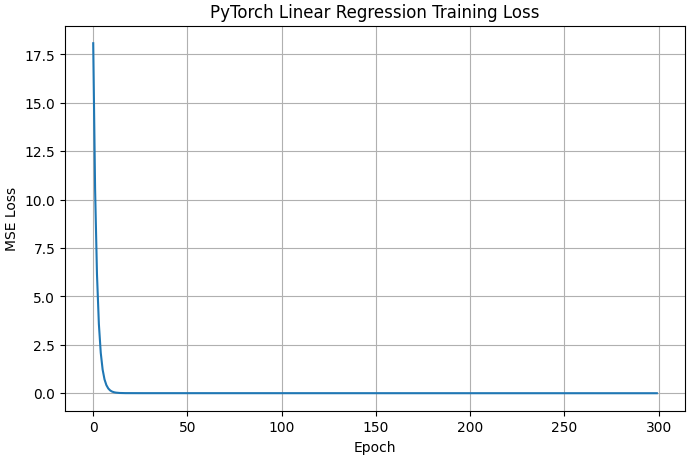
이번에는 다층신경망에서 역전파를 확인해보자.
마찬가지로 데이터 준비
# ============================================================
# 14. XOR 데이터 준비
# ============================================================

# XOR 입력 데이터입니다.
X_xor = torch.tensor([[0.0, 0.0], [0.0, 1.0], [1.0, 0.0], [1.0, 1.0]])

# XOR 정답 데이터입니다. 두 입력이 다르면 1, 같으면 0입니다.
y_xor = torch.tensor([[0.0], [1.0], [1.0], [0.0]])
다층 퍼셉트론 모델 정의,
# ============================================================
# 15. XOR 다층 퍼셉트론 모델 정의
# ============================================================

class XORModel(nn.Module):
    # 모델 계층을 정의합니다.
    def __init__(self):
        # 부모 클래스 초기화입니다.
        super().__init__()

        # 입력 2개를 은닉 뉴런 8개로 변환하는 선형 계층입니다.
        self.fc1 = nn.Linear(2, 8)

        # ReLU는 비선형성을 추가하는 활성화 함수입니다.
        self.relu = nn.ReLU()

        # 은닉 뉴런 8개를 출력 1개로 변환하는 선형 계층입니다.
        self.fc2 = nn.Linear(8, 1)

        # Sigmoid는 출력값을 0~1 범위로 변환합니다.
        self.sigmoid = nn.Sigmoid()

    # 순전파를 정의합니다.
    def forward(self, x):
        # 첫 번째 선형 계층을 통과합니다.
        x = self.fc1(x)

        # ReLU 활성화 함수를 적용합니다.
        x = self.relu(x)

        # 두 번째 선형 계층을 통과합니다.
        x = self.fc2(x)

        # Sigmoid로 확률 형태의 출력을 만듭니다.
        x = self.sigmoid(x)

        # 최종 결과를 반환합니다.
        return x

# XOR 모델을 생성합니다.
xor_model = XORModel()

# 모델 구조를 출력합니다.
print(xor_model)
이진분류문제에서 사용하는 손실함수 BCELoss() 사용
# ============================================================
# 16. XOR 모델 학습 설정
# ============================================================

# BCELoss는 이진 분류 문제에서 사용하는 손실함수입니다.
xor_criterion = nn.BCELoss()

# Adam은 학습률을 적응적으로 조정하는 최적화 알고리즘입니다.
xor_optimizer = optim.Adam(xor_model.parameters(), lr=0.05)

# 손실값 기록 리스트입니다.
xor_losses = []
모델학습 및 확인
# ============================================================
# 17. XOR 모델 학습
# ============================================================

# 1000번 반복 학습합니다.
for epoch in range(1000):
    # 순전파로 예측값을 계산합니다.
    xor_pred = xor_model(X_xor)

    # 예측값과 정답값을 비교하여 손실을 계산합니다.
    xor_loss = xor_criterion(xor_pred, y_xor)

    # 이전 기울기를 초기화합니다.
    xor_optimizer.zero_grad()

    # 역전파로 각 가중치의 기울기를 계산합니다.
    xor_loss.backward()

    # 계산된 기울기로 가중치를 수정합니다.
    xor_optimizer.step()

    # 손실값을 기록합니다.
    xor_losses.append(xor_loss.item())

    # 200번마다 손실을 출력합니다.
    if (epoch + 1) % 200 == 0:
        print(f"epoch={epoch+1:04d}, loss={xor_loss.item():.6f}")
# ============================================================
# 18. XOR 예측 결과 확인
# ============================================================
# 모델을 평가 모드로 변경합니다.
xor_model.eval()
# 예측에는 기울기 계산이 필요 없으므로 no_grad를 사용합니다.
with torch.no_grad():
# XOR 입력에 대한 예측 확률을 계산합니다.
xor_outputs = xor_model(X_xor)
# 0.5 이상이면 1, 미만이면 0으로 분류합니다.
xor_classes = (xor_outputs >= 0.5).float()
# 결과를 출력합니다.
print("예측 확률:")
print(xor_outputs)
print("예측 클래스:")
print(xor_classes)
print("실제 정답:")
print(y_xor)# ============================================================
# 19. XOR 손실 그래프
# ============================================================
plt.figure(figsize=(8, 5))
plt.plot(xor_losses)
plt.title("XOR Training Loss with Backpropagation")
plt.xlabel("Epoch")
plt.ylabel("Binary Cross Entropy Loss")
plt.grid(True)
plt.show()

정리해보자. 오차역전파의 핵심코드는 아래 3줄이다.
1. optimizer.zero_grad()
2. loss.backward()
3. optimizer.step()
이번에는 backpropagation_tensorflow_keras 코드로 tensorflow에서 확인해보자 .
import
# ============================================================
# 1. TensorFlow/Keras 라이브러리 불러오기
# ============================================================

# TensorFlow는 딥러닝 모델 생성, 자동 미분, 학습 기능을 제공하는 라이브러리입니다.
import tensorflow as tf

# Keras는 TensorFlow 안에서 제공되는 고수준 딥러닝 API입니다.
from tensorflow import keras

# layers는 Dense 같은 신경망 계층을 만들 때 사용합니다.
from tensorflow.keras import layers

# NumPy는 배열과 수치 계산을 위해 사용합니다.
import numpy as np

# matplotlib은 손실값 변화를 그래프로 확인하기 위해 사용합니다.
import matplotlib.pyplot as plt

# TensorFlow 버전을 출력합니다.
print("TensorFlow version:", tf.__version__)
tf.random.seed~ 시드고정
# ============================================================
# 2. 재현성을 위한 시드 고정
# ============================================================

# TensorFlow의 무작위 연산 결과를 가능한 한 일정하게 만들기 위해 시드를 고정합니다.
tf.random.set_seed(42)

# NumPy의 무작위 연산 결과도 일정하게 만들기 위해 시드를 고정합니다.
np.random.seed(42)
x, target를 상수로 변환 tf.constant
w가중치를 변수로 만들기 tf.Variable(3.0)
GradientTape, 이 안에서 일어나는 계산을 전부 기록한다.
tape.gradient(loss, w) 기록을 바탕을 기울기 계산에 사용한다.
# ============================================================
# 3. 단순 계산식 예제
# ============================================================

# 입력값 x를 TensorFlow 상수로 만듭니다.
x = tf.constant(2.0)

# 정답값 target을 TensorFlow 상수로 만듭니다.
target = tf.constant(10.0)

# 가중치 w를 TensorFlow 변수로 만듭니다.
# tf.Variable은 학습 중 값이 변경될 수 있는 텐서입니다.
w = tf.Variable(3.0)

# GradientTape는 이 블록 안의 계산 과정을 기록합니다.
with tf.GradientTape() as tape:
    # 순전파: 입력값과 가중치를 곱해 예측값을 계산합니다.
    prediction = x * w

    # 손실 계산: 정답값과 예측값의 차이를 제곱합니다.
    loss = (target - prediction) ** 2

# loss를 w로 미분하여 기울기를 계산합니다.
gradient = tape.gradient(loss, w)

# 계산 결과를 출력합니다.
print("입력값 x:", x.numpy())
print("초기 가중치 w:", w.numpy())
print("예측값:", prediction.numpy())
print("정답값:", target.numpy())
print("손실값:", loss.numpy())
print("w에 대한 기울기:", gradient.numpy())
assign_sub tensorflow 메서드로
기울기를 직접 수정할 수 있다. 경사하강법 공식을 활용해보자.
# ============================================================
# 4. 기울기를 사용해 가중치 직접 수정
# ============================================================

# 학습률을 설정합니다.
learning_rate = 0.01

# assign_sub는 변수에서 특정 값을 빼서 업데이트합니다.
# 경사하강법 공식 w = w - learning_rate * gradient를 적용합니다.
w.assign_sub(learning_rate * gradient)

# 수정된 가중치를 출력합니다.
print("수정 후 가중치 w:", w.numpy())
반복학습.
# ============================================================
# 5. 단일 가중치 반복 학습
# ============================================================

# 학습할 가중치를 다시 초기화합니다.
w = tf.Variable(3.0)

# 입력값과 정답값을 설정합니다.
x = tf.constant(2.0)
target = tf.constant(10.0)

# 학습률을 설정합니다.
learning_rate = 0.05

# 손실값 기록 리스트를 생성합니다.
loss_history = []

# 30번 반복 학습합니다.
for epoch in range(30):
    # GradientTape로 순전파 계산 과정을 기록합니다.
    with tf.GradientTape() as tape:
        # 순전파: 현재 가중치로 예측값을 계산합니다.
        prediction = x * w

        # 손실 계산: 예측값과 정답값의 차이를 제곱합니다.
        loss = (target - prediction) ** 2

    # 손실을 w에 대해 미분하여 기울기를 계산합니다.
    gradient = tape.gradient(loss, w)

    # 경사하강법으로 가중치를 업데이트합니다.
    w.assign_sub(learning_rate * gradient)

    # 손실값을 기록합니다.
    loss_history.append(loss.numpy())

    # 학습 상태를 출력합니다.
    print(f"epoch={epoch+1:02d}, w={w.numpy():.4f}, prediction={prediction.numpy():.4f}, loss={loss.numpy():.4f}")
출력.
# ============================================================
# 6. 손실 감소 그래프
# ============================================================

plt.figure(figsize=(8, 5))
plt.plot(loss_history, marker="o")
plt.title("Loss Decrease by Backpropagation")
plt.xlabel("Epoch")
plt.ylabel("Loss")
plt.grid(True)
plt.show()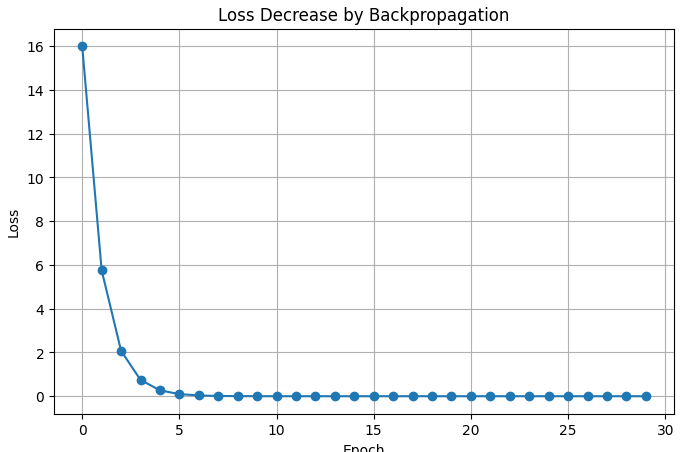
마찬가지로 keras 선형 회귀모델로 확인해보자.
x, y 설정
# ============================================================
# 7. 학습 데이터 생성
# ============================================================

# 입력 데이터입니다. shape은 (샘플 수, 입력 특성 수)입니다.
X = np.array([[1.0], [2.0], [3.0], [4.0], [5.0]], dtype=np.float32)

# 정답 데이터입니다. y = 2x + 1 규칙을 따릅니다.
y = np.array([[3.0], [5.0], [7.0], [9.0], [11.0]], dtype=np.float32)

# 데이터 형태를 출력합니다.
print("X shape:", X.shape)
print("y shape:", y.shape)
keras.Sequential 선형회귀모델 정의
layer.Dense 완전연결 계층 입력 1개를 받아 출력 1개를 만든다.
# ============================================================
# 8. Keras 선형 회귀 모델 정의
# ============================================================

# Sequential은 계층을 순서대로 쌓는 가장 간단한 모델 작성 방식입니다.
linear_model = keras.Sequential([
    # Dense는 완전연결 계층입니다. 입력 1개를 받아 출력 1개를 만듭니다.
    layers.Dense(units=1, input_shape=(1,))
])

# 모델 구조를 출력합니다.
linear_model.summary()
learning rate값과 함께 SGD optimizers 컴파일, 손실함수는 mse를 사용한다.
# ============================================================
# 9. 모델 컴파일
# ============================================================

# compile은 학습에 필요한 최적화 알고리즘과 손실함수를 설정합니다.
linear_model.compile(
    # SGD는 기울기를 사용해 가중치를 수정하는 최적화 알고리즘입니다.
    optimizer=keras.optimizers.SGD(learning_rate=0.01),

    # mse는 평균제곱오차이며 회귀 문제에서 자주 사용합니다.
    loss="mse"
)
모델학습 및 결과확인
linear_model.layers[0].get_weights() 파라미터 가져오기, 항상 2개를 반환한다. 순서 0으로 가중치, 1로 bias 편향.
# ============================================================
# 10. Keras 모델 학습
# ============================================================

# fit은 내부적으로 순전파, 손실 계산, 역전파, 가중치 업데이트를 반복합니다.
history = linear_model.fit(X, y, epochs=300, verbose=0)

# 학습 완료 메시지를 출력합니다.
print("학습 완료")

# ============================================================
# 11. 학습 결과 확인
# ============================================================

# Dense 계층의 가중치와 편향을 가져옵니다.
weights, bias = linear_model.layers[0].get_weights()

# 정답이 y = 2x + 1이므로 weight는 2, bias는 1에 가까워지는 것이 목표입니다.
print("학습된 weight:", weights[0][0])
print("학습된 bias:", bias[0])

# 새로운 입력값으로 예측합니다.
new_x = np.array([[10.0]], dtype=np.float32)
new_prediction = linear_model.predict(new_x, verbose=0)

# 예측 결과를 출력합니다.
print("x=10일 때 예측값:", new_prediction[0][0])
# ============================================================
# 12. 학습 손실 그래프
# ============================================================

plt.figure(figsize=(8, 5))
plt.plot(history.history["loss"])
plt.title("Keras Linear Regression Training Loss")
plt.xlabel("Epoch")
plt.ylabel("MSE Loss")
plt.grid(True)
plt.show()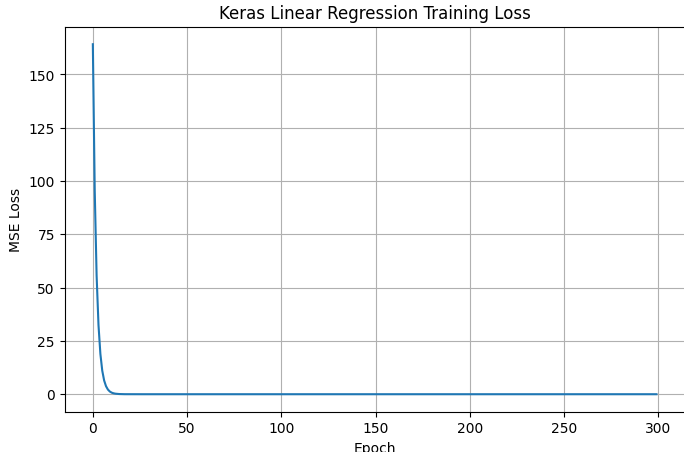
gradientTape으로 수동학습해보자.
keras.sequential 선형 회귀모델을 생성한다.
keras.losses.MeanSquaredError 손실함수객체생성
keras,oprimizers.SGD() SGD 최적화 알고리즘 객체 생성
| SGD | 가장 기본 | 낮음 |
| Momentum | SGD 개선 | 보통 |
| Adagrad | 희소 데이터에 강함 | 낮음 |
| RMSprop | RNN 학습에 사용 | 보통 |
| Adam | 범용적으로 강력 | 높음 |
| AdamW | Adam 개선판 | 매우 높음 |
# ============================================================
# 13. 수동 학습용 모델과 손실함수 설정
# ============================================================

# 새 선형 회귀 모델을 생성합니다.
manual_model = keras.Sequential([
    # 입력 1개를 받아 출력 1개를 만드는 Dense 계층입니다.
    layers.Dense(units=1, input_shape=(1,))
])

# 평균제곱오차 손실함수 객체를 생성합니다.
mse_loss = keras.losses.MeanSquaredError()

# SGD 최적화 알고리즘 객체를 생성합니다.
optimizer = keras.optimizers.SGD(learning_rate=0.01)

# NumPy 배열을 TensorFlow 텐서로 변환합니다.
X_tensor = tf.constant(X)
y_tensor = tf.constant(y)

# 손실값 기록 리스트입니다.
manual_losses = []
300을 epoch만큼 학습
tf.GradientTape()로 과정기록.
predictions, loss를 구해 tape.gradient() 기울기 계산, optimizer.apply_gradient() 가중치와 편향 수정
# ============================================================
# 14. GradientTape 수동 학습 루프
# ============================================================

# 300번 반복 학습합니다.
for epoch in range(300):
    # GradientTape는 모델의 순전파 계산 과정을 기록합니다.
    with tf.GradientTape() as tape:
        # 순전파: 현재 모델로 예측값을 계산합니다.
        predictions = manual_model(X_tensor, training=True)

        # 손실 계산: 예측값과 정답값의 차이를 계산합니다.
        loss = mse_loss(y_tensor, predictions)

    # 모델의 학습 가능한 변수들에 대한 기울기를 계산합니다.
    gradients = tape.gradient(loss, manual_model.trainable_variables)

    # 계산된 기울기를 이용하여 가중치와 편향을 수정합니다.
    optimizer.apply_gradients(zip(gradients, manual_model.trainable_variables))

    # 손실값을 기록합니다.
    manual_losses.append(loss.numpy())

    # 50번마다 손실을 출력합니다.
    if (epoch + 1) % 50 == 0:
        print(f"epoch={epoch+1:03d}, loss={loss.numpy():.6f}")
# ============================================================
# 15. 수동 학습 결과 확인
# ============================================================
# 수동 학습 모델의 가중치와 편향을 가져옵니다.
manual_weights, manual_bias = manual_model.layers[0].get_weights()
# 결과를 출력합니다.
print("수동 학습 weight:", manual_weights[0][0])
print("수동 학습 bias:", manual_bias[0])
# 손실 그래프를 출력합니다.
plt.figure(figsize=(8, 5))
plt.plot(manual_losses)
plt.title("Manual Training Loss with GradientTape")
plt.xlabel("Epoch")
plt.ylabel("MSE Loss")
plt.grid(True)
plt.show()
마찬가지로 마지막 XOR 다층 신경망을 확인해보자.
xy 세팅.
keras.sequential, layers.Dense() acication은 relu로, 은닉층을 만든다 .
| Sigmoid | 0~1 | 확률 해석 쉬움 | 기울기 소실 | 이진분류 출력층 |
| Tanh | -1~1 | 0 중심 | 기울기 소실 | 과거 RNN |
| ReLU | 0~∞ | 빠름, 표준 | Dead ReLU | 은닉층 |
| Leaky ReLU | -∞~∞ | Dead ReLU 완화 | 추가 파라미터 | 은닉층 |
| GELU | -∞~∞ | 부드럽고 성능 좋음 | 계산량 증가 | Transformer |
| Swish | -∞~∞ | 부드러움 | 계산량 증가 | 일부 최신 모델 |
| Softmax | 0~1 (합=1) | 확률 변환 | 출력층 전용 | 다중분류 |
# ============================================================
# 16. XOR 데이터 준비
# ============================================================

# XOR 입력 데이터입니다.
X_xor = np.array([[0.0, 0.0], [0.0, 1.0], [1.0, 0.0], [1.0, 1.0]], dtype=np.float32)

# XOR 정답 데이터입니다. 두 입력이 다르면 1, 같으면 0입니다.
y_xor = np.array([[0.0], [1.0], [1.0], [0.0]], dtype=np.float32)
컴파일
모델객체.fit() 학습.
모델객체.predict() 예측 확률 확인
위 확률이 0.5 이상, 미만으로 astype() 분류.
# ============================================================
# 18. XOR 모델 컴파일
# ============================================================

# 이진 분류 문제이므로 binary_crossentropy 손실함수를 사용합니다.
xor_model.compile(
    # Adam은 학습률을 자동 조정하는 최적화 알고리즘입니다.
    optimizer=keras.optimizers.Adam(learning_rate=0.05),

    # 이진 분류 손실함수입니다.
    loss="binary_crossentropy",

    # 정확도를 함께 확인합니다.
    metrics=["accuracy"]
)

# ============================================================
# 19. XOR 모델 학습
# ============================================================

# XOR 데이터는 매우 작으므로 전체 데이터를 반복해서 학습합니다.
xor_history = xor_model.fit(X_xor, y_xor, epochs=1000, verbose=0)

# 학습 완료 메시지를 출력합니다.
print("XOR 모델 학습 완료")

# ============================================================
# 20. XOR 예측 결과 확인
# ============================================================

# 학습된 모델로 XOR 입력값에 대한 예측 확률을 계산합니다.
xor_probs = xor_model.predict(X_xor, verbose=0)

# 확률이 0.5 이상이면 1, 미만이면 0으로 분류합니다.
xor_classes = (xor_probs >= 0.5).astype(np.float32)

# 결과를 출력합니다.
print("예측 확률:")
print(xor_probs)
print("예측 클래스:")
print(xor_classes)
print("실제 정답:")
print(y_xor)
시각화
# ============================================================
# 21. XOR 손실 그래프
# ============================================================

plt.figure(figsize=(8, 5))
plt.plot(xor_history.history["loss"])
plt.title("XOR Training Loss with Backpropagation")
plt.xlabel("Epoch")
plt.ylabel("Binary Crossentropy Loss")
plt.grid(True)
plt.show()
딥러닝의 학습과정은 아래와같다.
입력 데이터 - 순전파 - 예측값 - 오차 계산 - 오차 역전파 - 기울기 계산 - 가중치 갱신
이론을 정리해보자.
연쇄법칙: 입력층 - 은닉층 - 은닉층 - 출력층
순전파": 입력층에서 출력층으로 이동하는 과정
손실함수: 예측값과 실제 정답의 차이를 계산
오차 역전파법: 딥러닝 신경망이 학습할때 사용하는 핵심 알고리즘. 가중치를 효율적으로 수정할 수 있고 수백만개 이상의 파라미터도 학습할 수 으며 pytorch나 tensorflow가 자동으로 미분을 계산해 loss.backward() 한줄로 역전차가 수행된다.
경사하강: 기울기계산
*가중치를 수정하려면 증가해야하는지 감소해야하는지를 알기위해 손실함수를 가중치에 대해 미분하며 이 기울기는 손실이 증가하는 방향을 의미한다.
컴퓨터 비전
디지털 이미지와 영상 속 사물을 식별하는 기술. 영상화질개선, 객체검출, 분할, 인식, 움직임정보 추출 및 추적등의 연구분야에 활용된다.
더 크게 공장자동화나 조명 렌즈, 필터, 실시간 처리등의 머신비전에 응용되거나 인공지능 로봇과 자율주행 자동차 등의 인공지능 서비스에 응용된다.
이미지입력 - 객체탐지(CNN이나 YOLO같은 딥러닝 모델) - 특징추출 - 객체인식 - 캡션생성
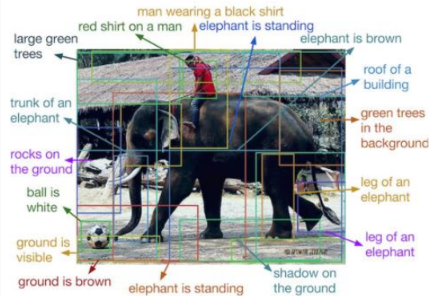
이미지가 보여주는 핵심 개념
이미지분류, 객체검출, 객체인식, 이미지 캠셔닝, 장면이해, Dense captioning여러 영역 세밀 설명
Dense Captioning
이미지분류는 이미지 = 코끼리 정도로 알려준다면 객체 탐지는 코끼리 위치, 사람위치, 공위치 등을 알려준다.
OpenCV, Open Source Computer Vision Library
이미지처리와 컴퓨터 비전을 위한 대표적인 오픈소스 라이브러리
무료로 사용할 수 있다. 컴퓨터 비전 및 머신러닝 기능을 제공한다. Pyton, C++, java등 다양한 언어, 다양한 운영체제를 지원한다. cpu, 멀티코어, cuda등의 고속처리를 지원한다.
이미지를 읽고 영상처리 및 필터링, 객체 검출, 얼굴 인식, 문자인식, 객체추적, 딥러닝 모델실행의 기능이 있다.
자율주행 자동차, cctv, 얼굴인식, 산업용 머신비전, 로봇 비전, 의료영상 분석, 증강현실에 이용된다.

openscv를 경험해보자.
colab은 GUI창을 띄울수없어
cv2.imshow()가 불가하다.
맨 마지막줄을 읽어보자.
from google.colab.patches import cv2_imshow
import cv2
from google.colab.patches import cv2_imshow

img = cv2.imread("cat.jpg")

# cv2.imshow("Image", img)
# cv2.waitKey(0)
# cv2.destroyAllWindows()

cv2_imshow(img)
만일 extension colab을 사용중이라면 google.colab import drive를 사용하자 .
import cv2
from google.colab.patches import cv2_imshow

from google.colab import drive
drive.mount('/content/drive')
# img = cv2.imread("cat.jpg")
img = cv2.imread("/content/drive/MyDrive/data/cat.jpg")

# cv2.imshow("Image", img)
# cv2.waitKey(0)
# cv2.destroyAllWindows()

cv2_imshow(img)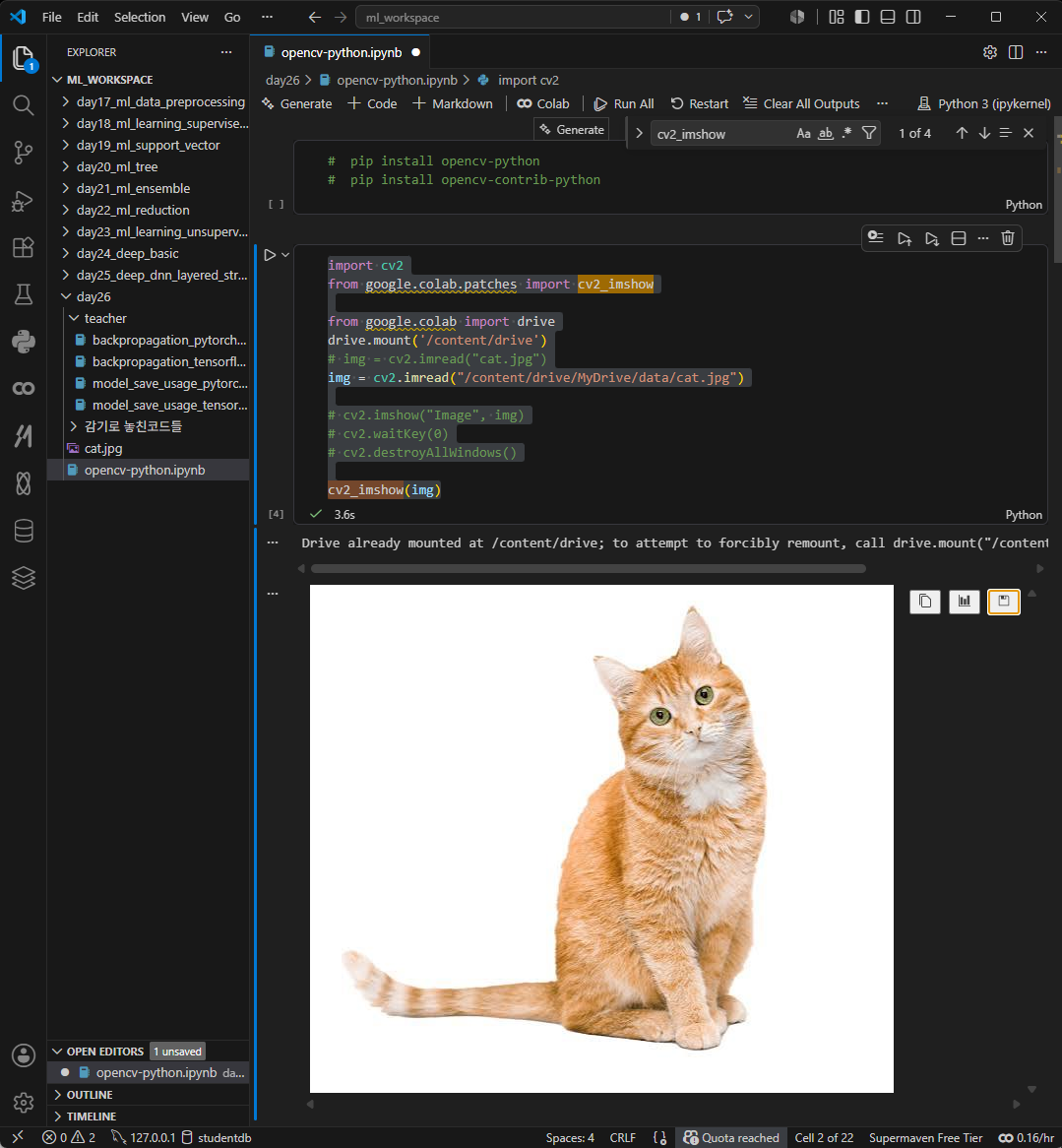
img.shape[0, 1, 2] 높이, 너비, 채널 확인하기 컬러이니 채널의 수는 3개가 나올것이다 .
print("높이:", img.shape[0])
print("너비:", img.shape[1])
print("채널:", img.shape[2])
빈영상만들기
높이, 너비, 채널수
import cv2
import numpy as np
from google.colab.patches import cv2_imshow

img = np.zeros((300, 400, 3), dtype=np.uint8)

cv2_imshow(img)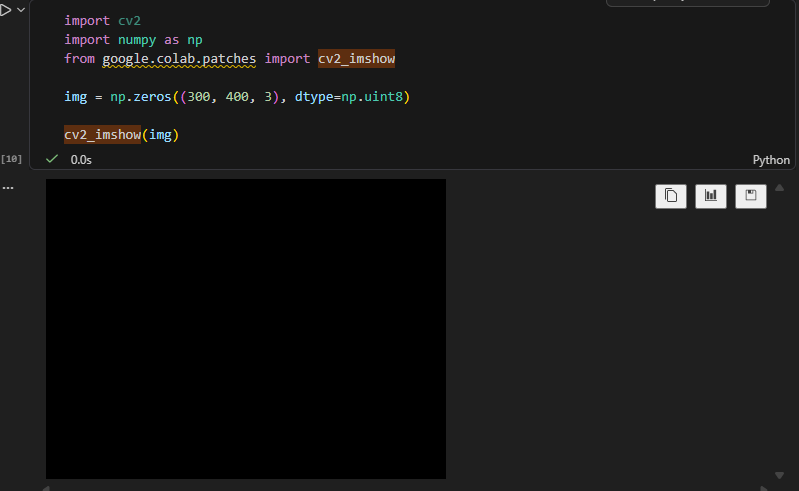
객체.copy() 영상 복사

crop = 객채[100:300, 200 :500] 세로를 300으로, 가로를 300으로 정사각형으로 만들었다.
import cv2

# img = cv2.imread("cat.jpg")
# cv2.waitKey(0)
# cv2.destroyAllWindows()

crop = copy_img[100:300, 200:500]
cv2_imshow(crop)
영상 위에 작은 로고를 합성하기.
import cv2

# img = crop
img = crop.copy()
logo = cv2.imread("/content/drive/MyDrive/data/logo.png")

width = 30
height = 30
logo = cv2.resize(logo, (width, height))
img[0:height, 0:width] = logo

cv2_imshow(img)

# cv2.imshow("Merged", img)
# cv2.waitKey(0)
# cv2.destroyAllWindows()
좀더 발전형으로.
위 고양이사진을 다시 imgread,logo도 read해 세팅해놓는다. 이떄 logo는 가져올때 cv2.IMREAD_UNCHANGED를해 원본 그대로 즉, 채널을 포함해 가져오는 옵션을 활성화한다.
각각 width height를 세팅하고 resize.
b, g, r, a opacity까지 split분리해 가져온다.
색만 따로 합치기 위해 overlay 변수에 rgb만 담는다.
mask 투명도는 완전 투명하게 세팅한다 . 투명도 정규화!
합성할 영역을 지정한다. roi 각 roi[:, :, c] 현재 사진 픽셀 값에 배경비율과 로고비율을 합친다 .
배경영역을 분리했다. roi 그리고 로고가 들어갈 자리를 잘라냈다.
로고는 overlay, mask 색상과 투명도를 준비했다. 두개를 섞었다. roi = background * (1 - mask) + logo * mask
roi[:, :, c] * (1 - mask) mask가 로고의 투명도라면 1-mask 배경이 남는 비율
overlay[:, :, c] * mask
즉 로고부분만 뺀 나머지 배경에 이미지를 설정하고, 로고부분에만 컬러적용해 합친다.
이제부터 각 픽셀마다 배경이미지 + 로고비율을 섞어야한다. for문. 채널은 컬러이니 3.
img에 roi이 결과물을 붙인다.
import cv2

# img = crop
img = cv2.imread("/content/drive/MyDrive/data/cat.jpg")
logo = cv2.imread("/content/drive/MyDrive/data/logo.png", cv2.IMREAD_UNCHANGED)

w_logo = 30
h_logo = 30
w_img = w_logo*10
h_img = h_logo*10
img = cv2.resize(img, (w_img, h_img))
logo = cv2.resize(logo, (w_logo, h_logo))


b, g, r, a = cv2.split(logo)
overlay = cv2.merge((b, g, r))
mask = a / 255.0
roi = img[0:h_logo, 0:w_logo]
for c in range(3):
    roi[:, :, c] = roi[:, :, c] * (1 - mask) + overlay[:, :, c] * mask

img[0:h_logo, 0:w_logo] = roi
# img[0:h_img, 0:w_img] = logo

cv2_imshow(img)

# cv2.imshow("Merged", img)
# cv2.waitKey(0)
# cv2.destroyAllWindows()
흑백전환 cv2.COLOR_BGR2GRAY
import cv2

# img = cv2.imread("cat.jpg")

gray = cv2.cvtColor(img, cv2.COLOR_BGR2GRAY)
cv2_imshow(gray)
# cv2.imshow("Gray", gray)
# cv2.waitKey(0)
# cv2.destroyAllWindows()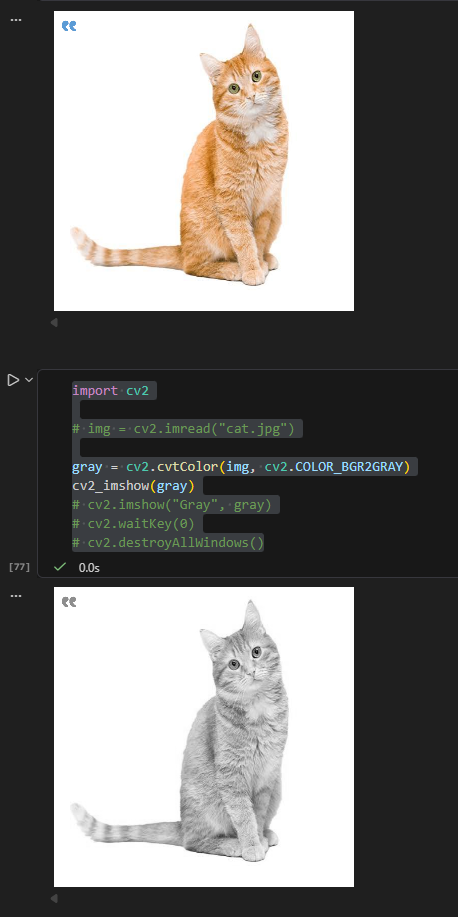
색분석용 데이터 hsv로 변환.
이후 딥러닝이나 영상처리에서 색 기반 작업을 할때 특정색 추출, 피부색 검출, 색필터링, 배경제거 등에 유리하다.
import cv2

# img = cv2.imread("cat.jpg")

hsv = cv2.cvtColor(img, cv2.COLOR_BGR2HSV)
cv2_imshow(hsv)

# 빨간색만 추출
mask = cv2.inRange(hsv, (0, 100, 100), (10, 255, 255))
mask
# cv2.imshow("HSV", hsv)
# cv2.waitKey(0)
# cv2.destroyAllWindows()
resize() 이미지 w * h 다시지정하기
import cv2

# img = cv2.imread("cat.jpg")

small = cv2.resize(img, (100, 100))
cv2_imshow(small)
# cv2.imshow("Resize", small)
# cv2.waitKey(0)
# cv2.destroyAllWindows()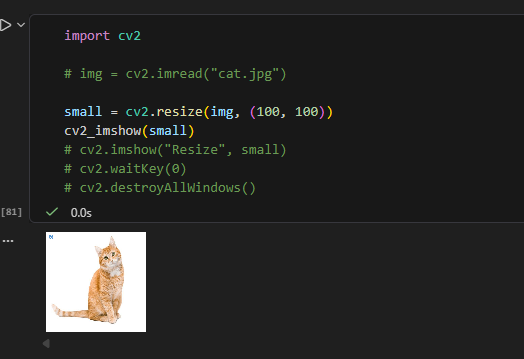
.rotate() 회전하기
import cv2

# img = cv2.imread("cat.jpg")

rotated = cv2.rotate(img, cv2.ROTATE_90_CLOCKWISE)
cv2_imshow(rotated)
# cv2.imshow("Rotate", rotated)
# cv2.waitKey(0)
# cv2.destroyAllWindows()
대각선도 그려보자.
line()
import cv2
import numpy as np

img = np.zeros((500, 500, 3), dtype=np.uint8)

cv2.line(img, (50, 50), (450, 450), (0, 255, 0), 3)

cv2_imshow(img)
# cv2.imshow("Line", img)
# cv2.waitKey(0)
# cv2.destroyAllWindows()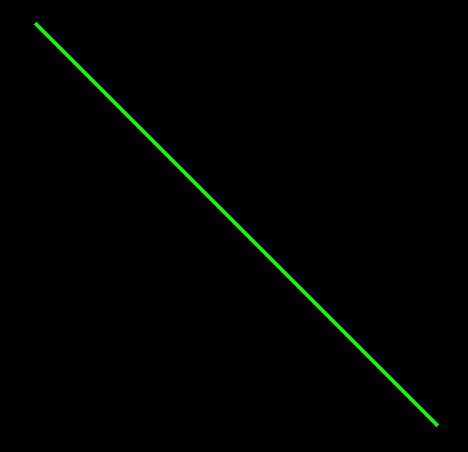
rectangle() 사각형을 만들어 더해보자.
cv2.rectangle(
    img,
    (100, 100),
    (300, 300),
    (255, 0, 0),
    3
)
cv2_imshow(img)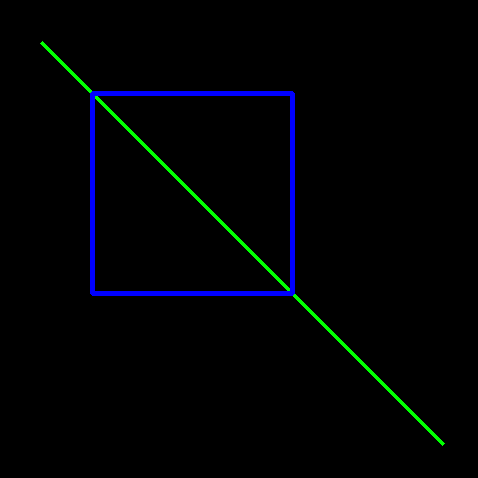
circle() 원도 추가해보자.
cv2.circle(
    img,
    (250, 250),
    100,
    (0, 0, 255),
    3
)
cv2_imshow(img)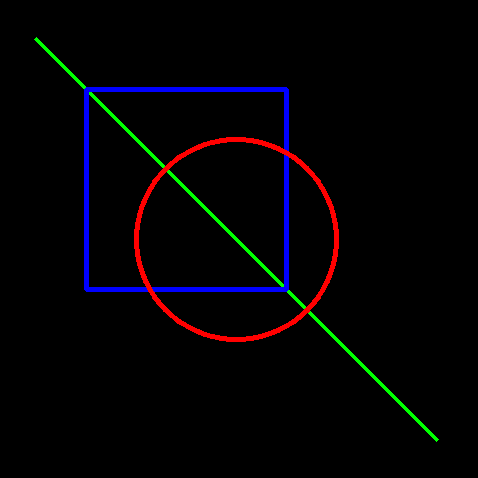
txt도 추가해보자 .
cv2.putText(
    img,
    "OpenCV",
    (100, 100),
    cv2.FONT_HERSHEY_SIMPLEX,
    2,
    (255, 255, 255),
    3
)

cv2_imshow(img)
cv2.VideoCapture(0)웹캠, 로컬카메라 켜기 ,0 카메라 장치 번호. 0은 내장웹켐, 1은 보통 외장 usb, 2부터는 추가 카메라를 의미.
로컬카메라객체.read() 한장 프레임사진 가져오기
colab은 실시간 창이 불가하다 그리는 GUI자체가없음.
커널을 python으로 아예 바꾸면 가능함.
ASCII코드 기준 27, ESC 눌르면 종료
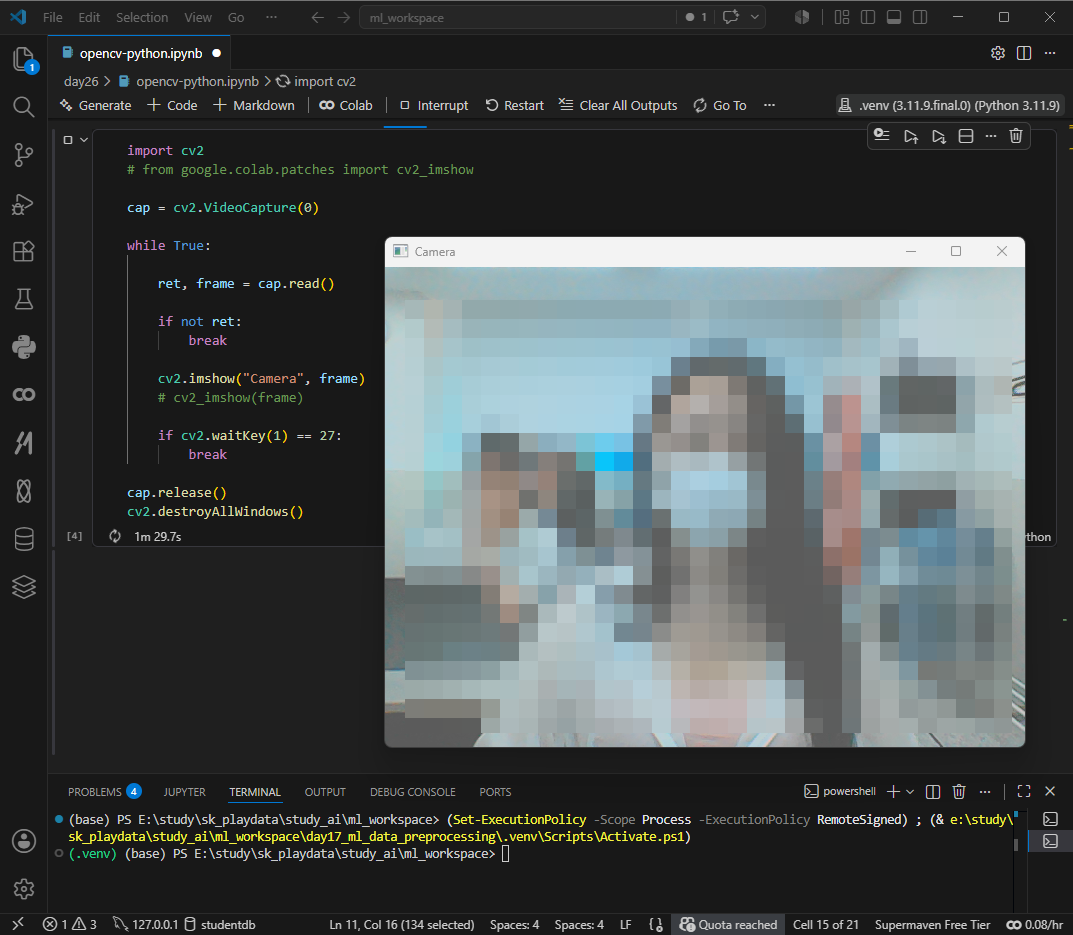
회색으로 다시.
import cv2

cap = cv2.VideoCapture(0)

while True:

    ret, frame = cap.read()

    gray = cv2.cvtColor(frame, cv2.COLOR_BGR2GRAY)

    cv2.imshow("Gray Camera", gray)

    if cv2.waitKey(1) == 27:
        break

cap.release()
cv2.destroyAllWindows()
나사에서 달 영상을 다운해 사용해보자. 마찬가지로 잘 동작된다 .
NASA Image and Video Library
NASA Image and Video Library, serving up consolidated imagery and videos in one searchable location. Users can download content in multiple sizes and resolutions and see the metadata associated with images, including EXIF/camera data on many images.
images.nasa.gov
https://images.nasa.gov/search?q=moon&page=1&media=video&yearStart=1920&yearEnd=2026
https://images.nasa.gov/details/NHQ_2020_0914_Observe%20the%20moon%20promo
import cv2

cap = cv2.VideoCapture("video.mp4")

while True:

    ret, frame = cap.read()

    if not ret:
        break

    cv2.imshow("Video", frame)

    if cv2.waitKey(30) == 27:
        break

cap.release()
cv2.destroyAllWindows()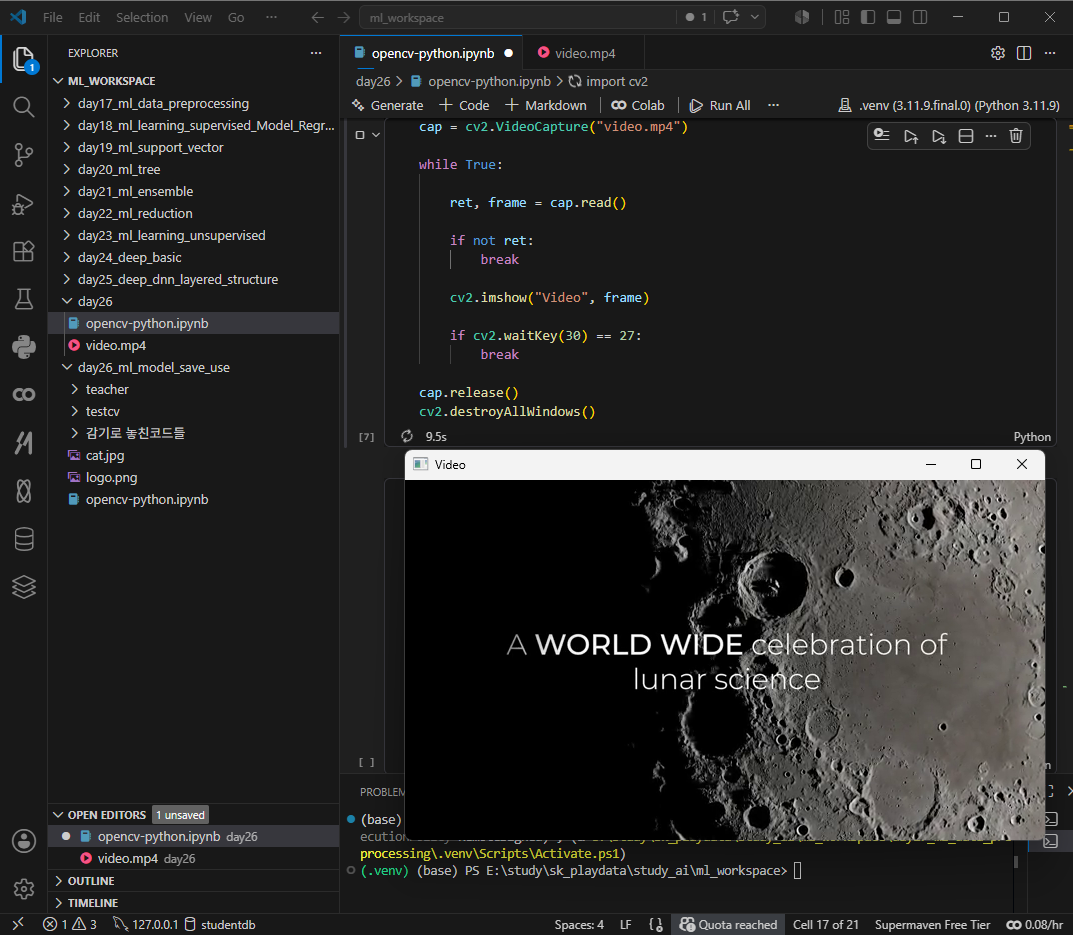
웹캠 활성화 및 다운로드하기
cv2.VidroWRiter_fourcc(*'XVID") 코덱설정,
* FOURCC four character code 영상 압축방식을 4글자로 표현하는 규칙
| 'XVID' | MPEG-4 계열 (가장 흔함) |
| 'MJPG' | Motion JPEG |
| 'mp4v' | MP4 기본 코덱 |
| 'H264' | 고압축 고화질 |
cv2.VideoWriter()
마찬가지로 release 사용종료하고 해제.
destoryAllwindows() opencv로 띄운 모든 창 닫기
import cv2

cap = cv2.VideoCapture(0)

fourcc = cv2.VideoWriter_fourcc(*'XVID')

out = cv2.VideoWriter(
    "output.avi",
    fourcc,
    20.0,
    (640, 480)
)

while True:

    ret, frame = cap.read()

    if not ret:
        break

    out.write(frame)

    cv2.imshow("Recording", frame)

    if cv2.waitKey(1) == 27:
        break

cap.release()
out.release()
cv2.destroyAllWindows()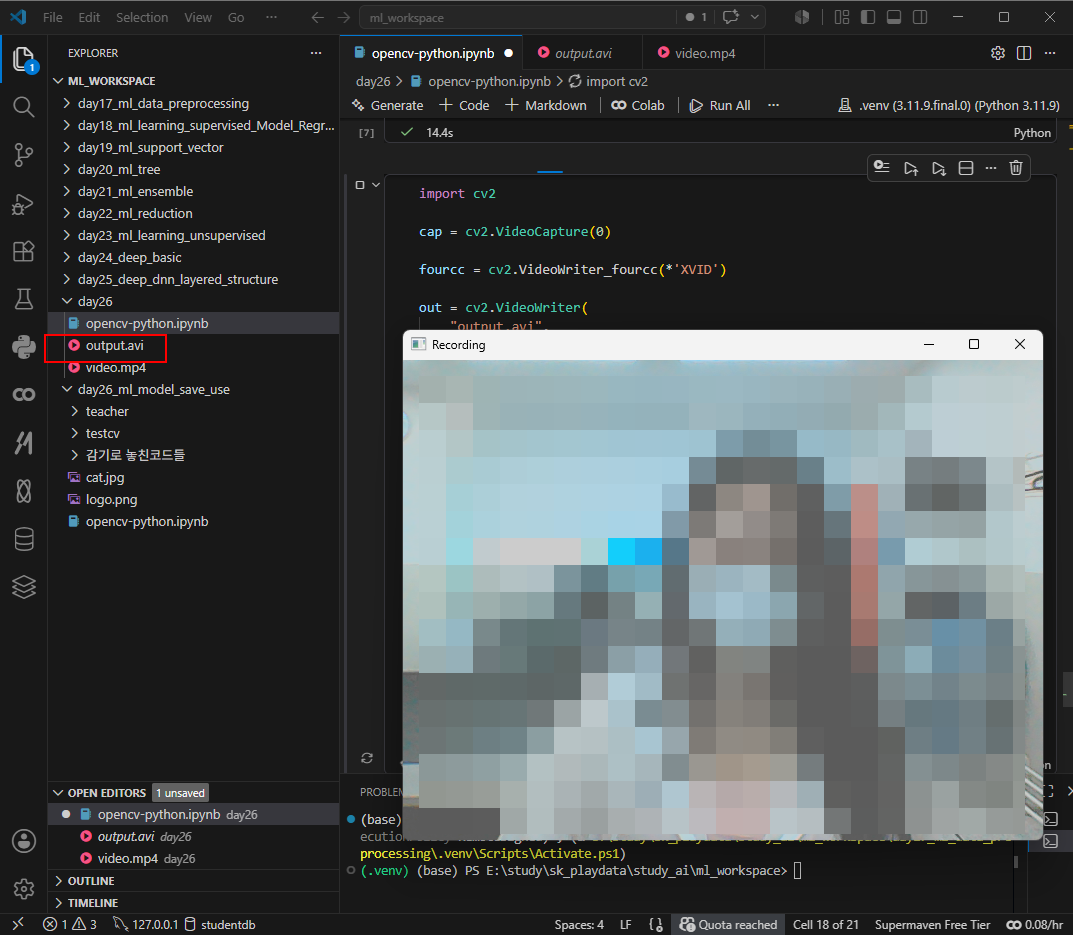
위는 개인적인 테스트였다. 강사를 따라 테스트해보자 .
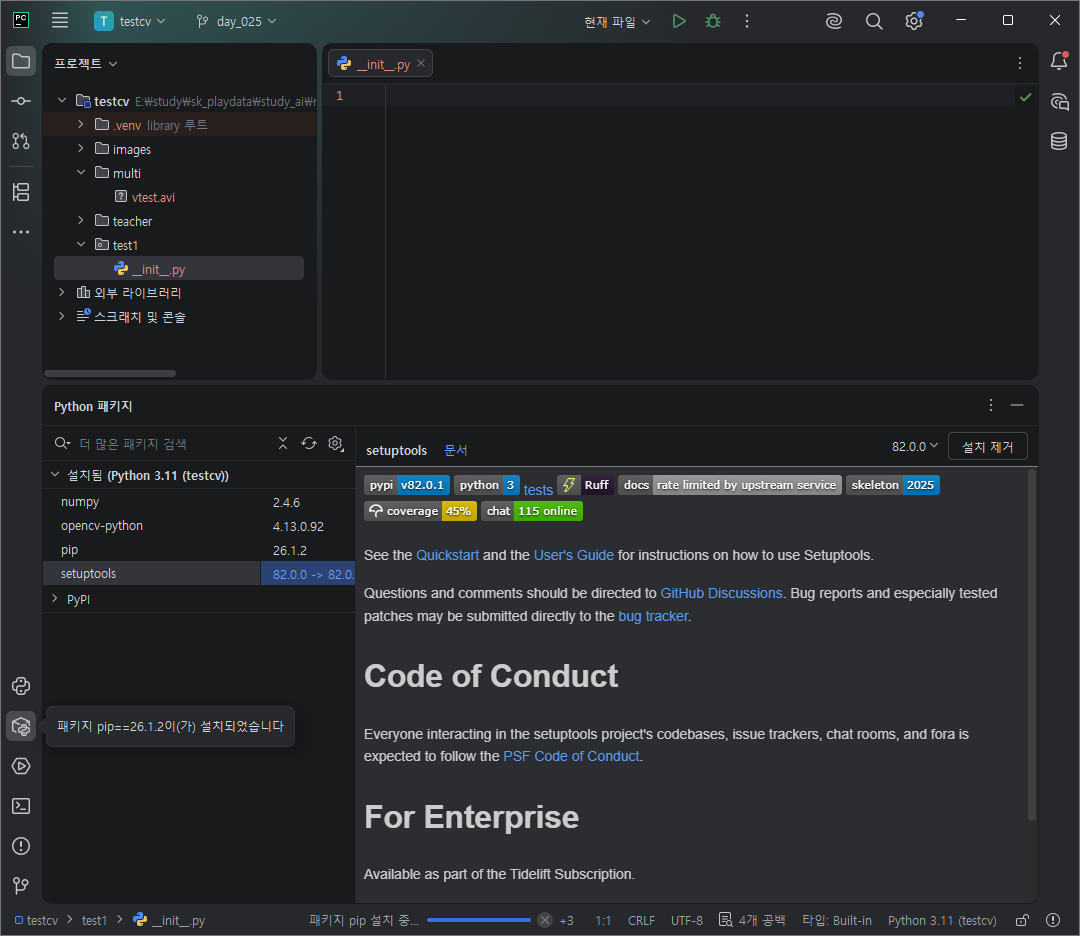
프로젝트 생성,
기다리기.
.가상환경 venv 가 뜰경우 세팅 완료.
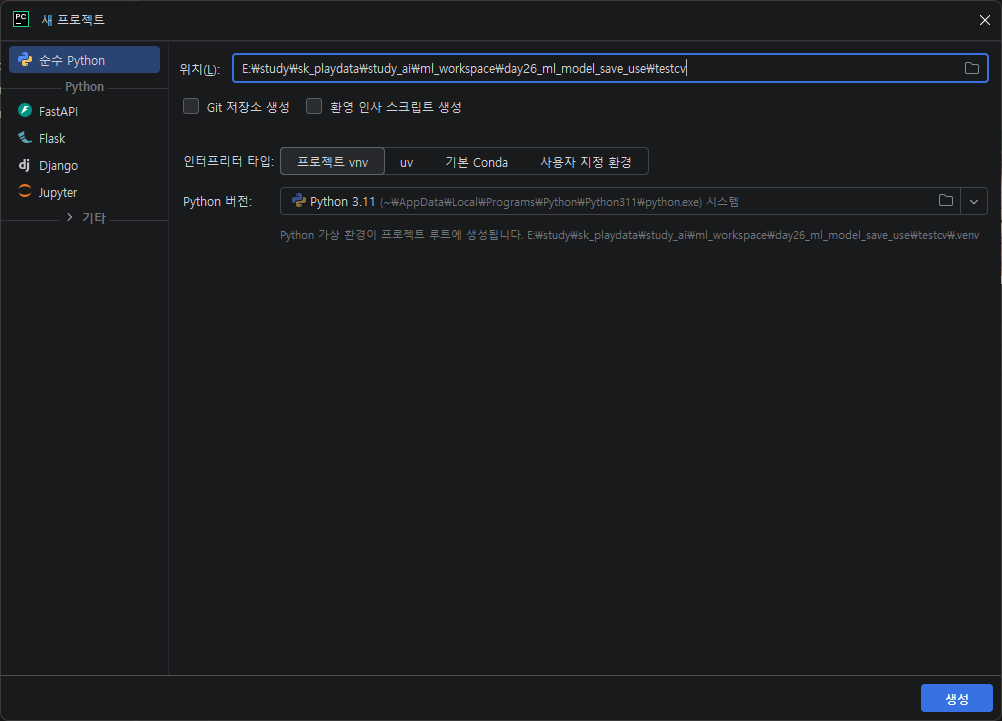
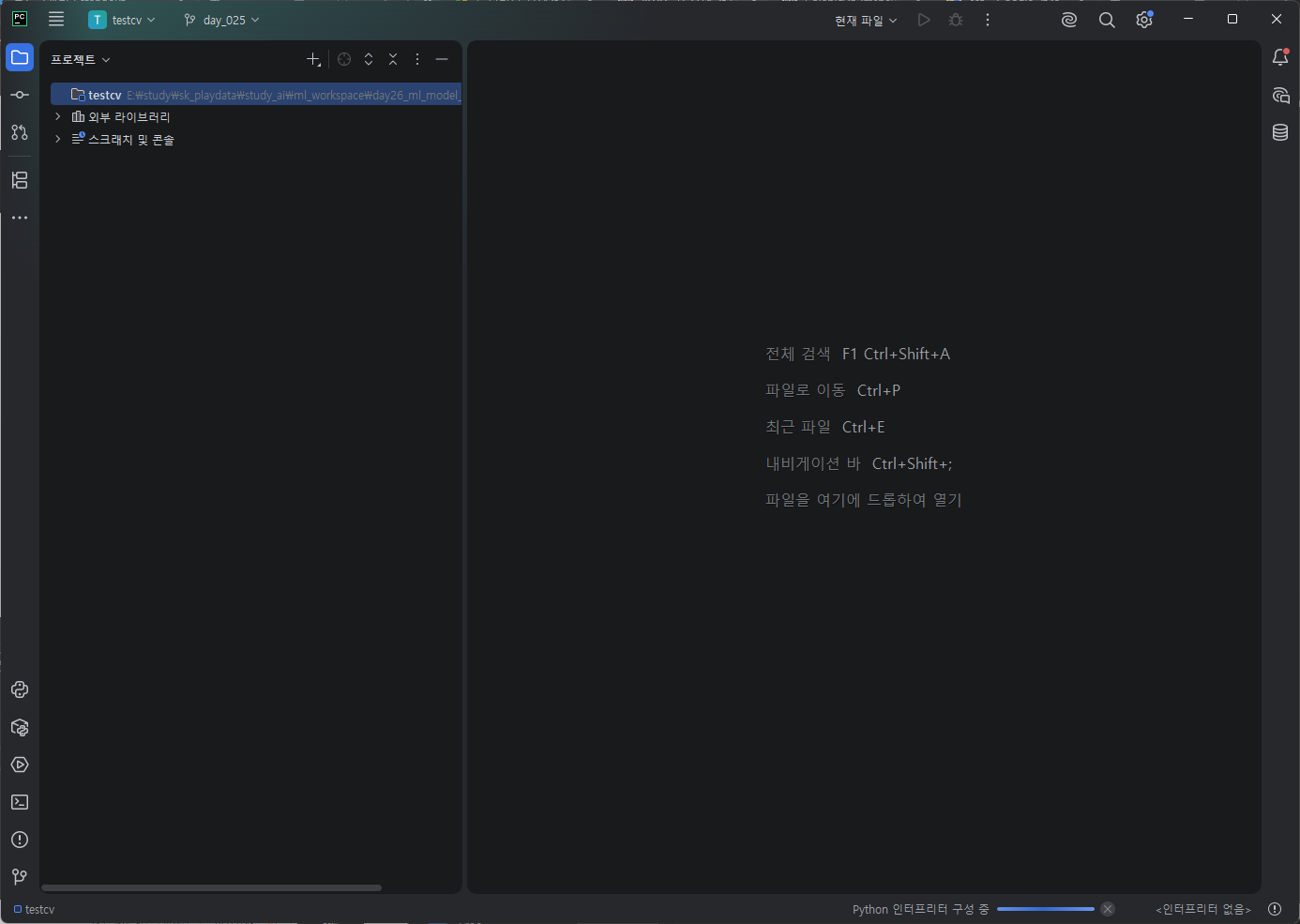
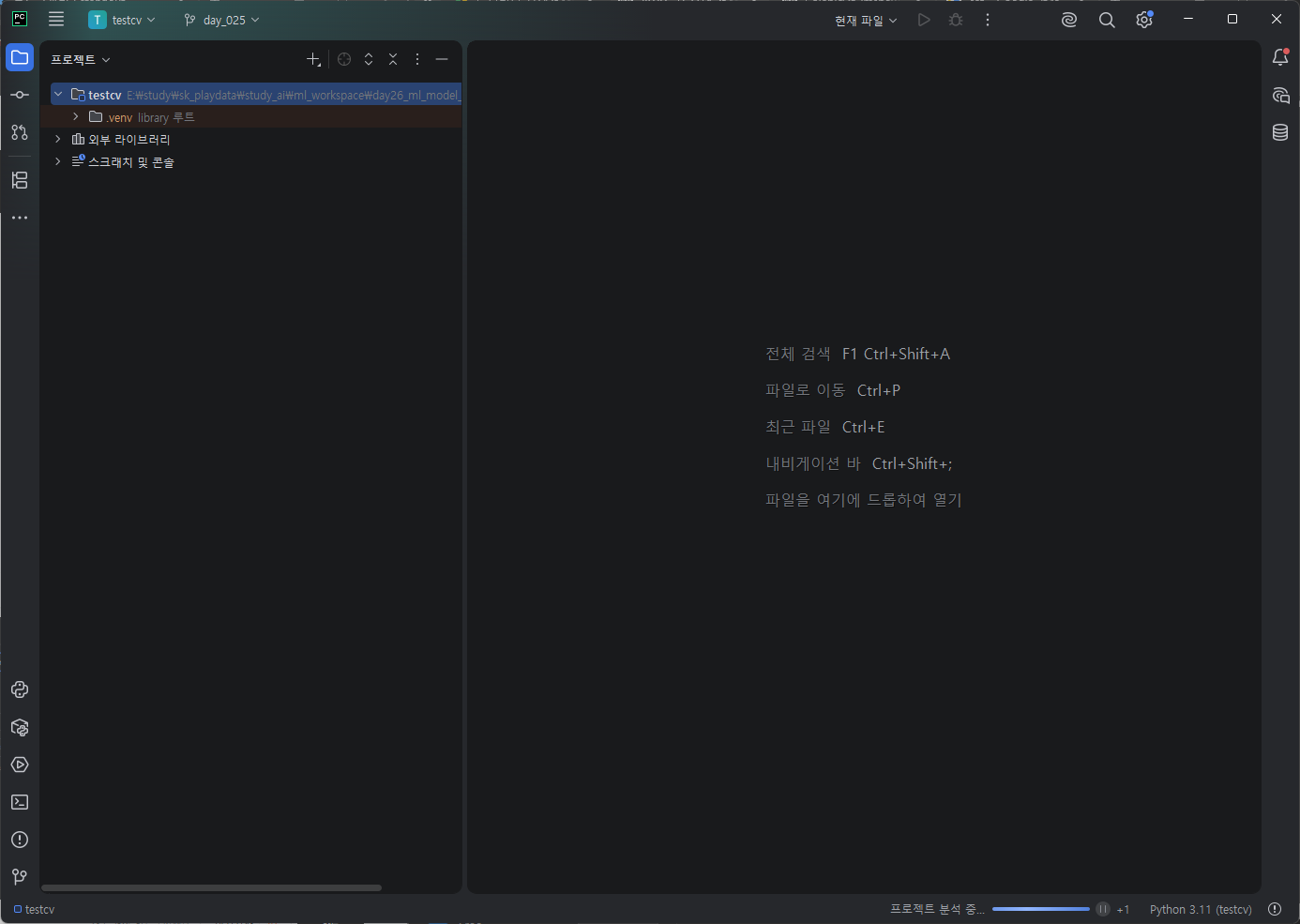
패키지 추가, init파일이 자동으로 생성되었다면 완료.


설치
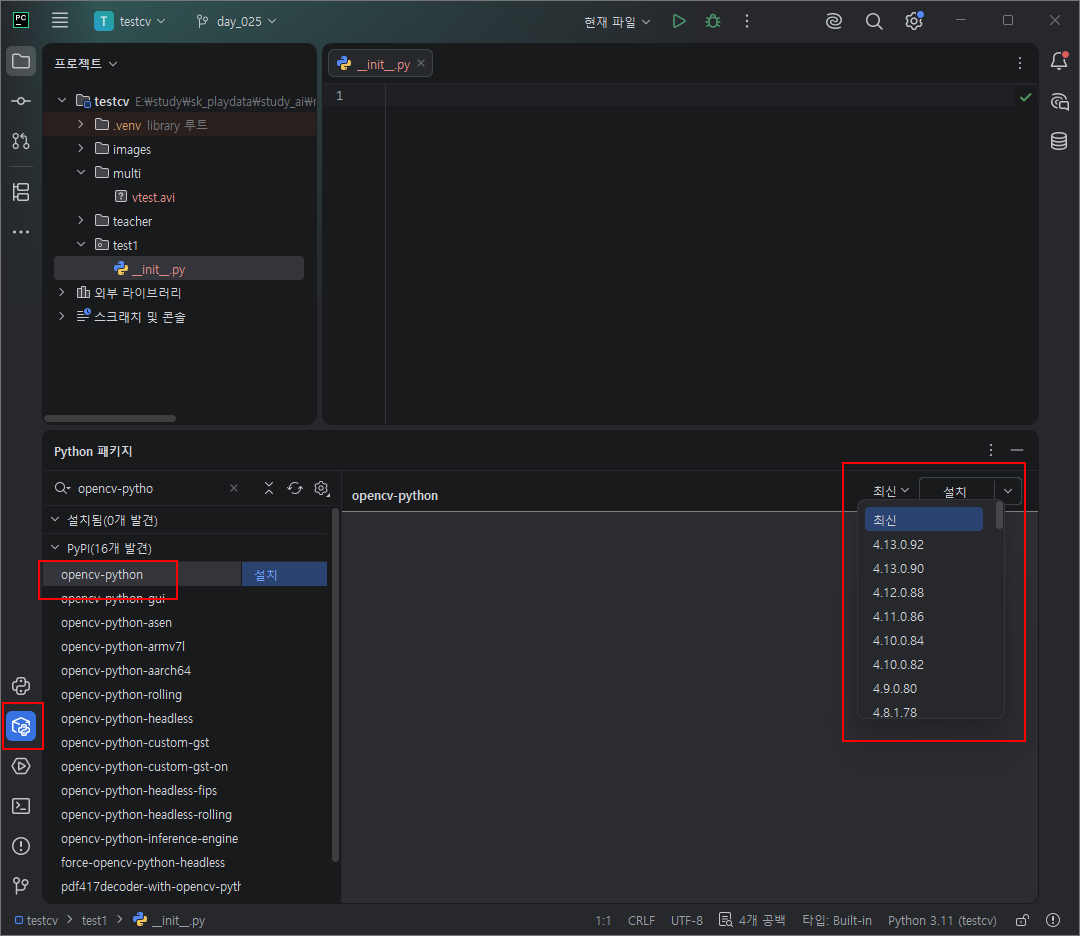
설치된 패키지 관리, 더블클릭시 업데이트됨.
# pip install opencv-python

import cv2
print('Hello OpenCV', cv2.__version__)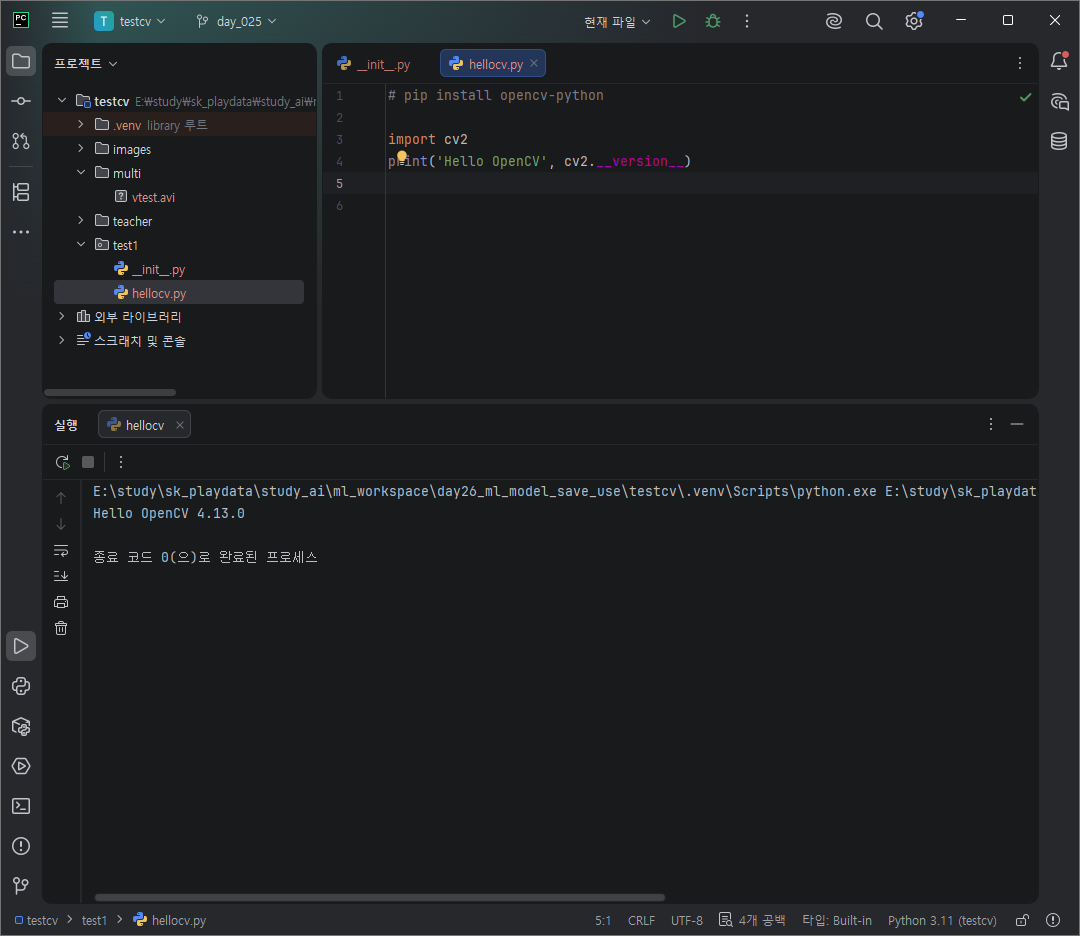
카메라 해상도 확인 prop_frame_~
print('Fame width:', round(cap.get(cv2.CAP_PROP_FRAME_WIDTH)))
print('Fame height:', round(cap.get(cv2.CAP_PROP_FRAME_HEIGHT)))
엣지, 아웃라인모드로 출력하기 canny()
실행.
while True:
    ret, frame = cap.read()
    if not ret:
        break

    cv2.imshow('Video', frame)

    edge = cv2.Canny(frame, 50, 150)
    cv2.imshow('Edge', edge)

    if cv2.waitKey(30) == 27:
        break

cap.release()
cv2.destroyAllWindows()
이미지 파일 읽기
import cv2
import sys
import os

basepath = os.path.dirname(__file__)
print(basepath)
img_path = os.path.join(basepath, "../images/cat.bmp")
img = cv2.imread(img_path)

if img is None:
    print("Error opening image")
    sys.exit()

cv2.namedWindow("Image", cv2.WINDOW_NORMAL)
cv2.imshow("Image", img)
cv2.waitKey(0)
cv2.destroyAllWindows()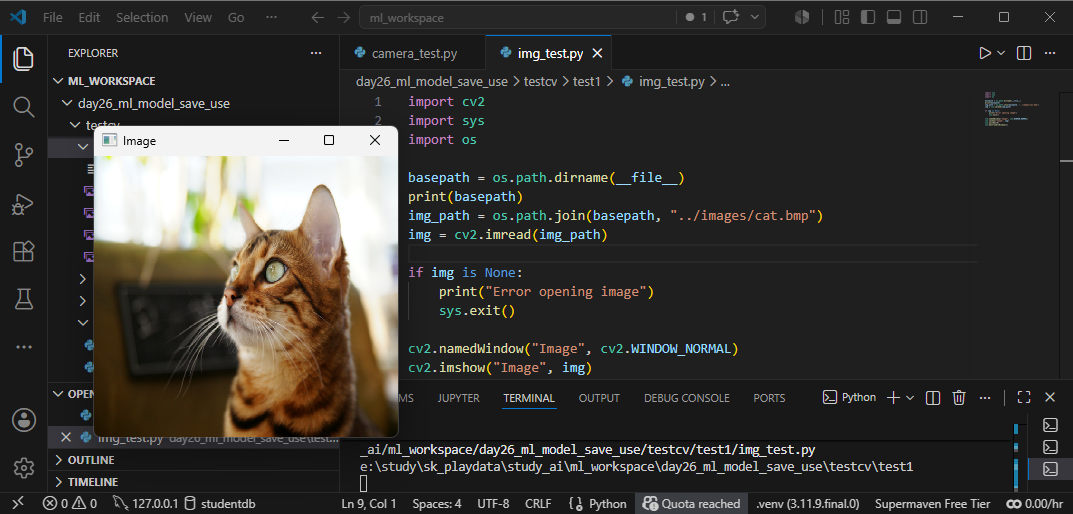
matplotlib 설치 및 이미지 확인
imgBGR = cv2.imread(img_path)
imgRGB = cv2.cvtColor(imgBGR, cv2.COLOR_BGR2RGB)
# cv2.imshow("Image", imgRGB)
plt.axis("off")
plt.imshow(imgRGB)
plt.show()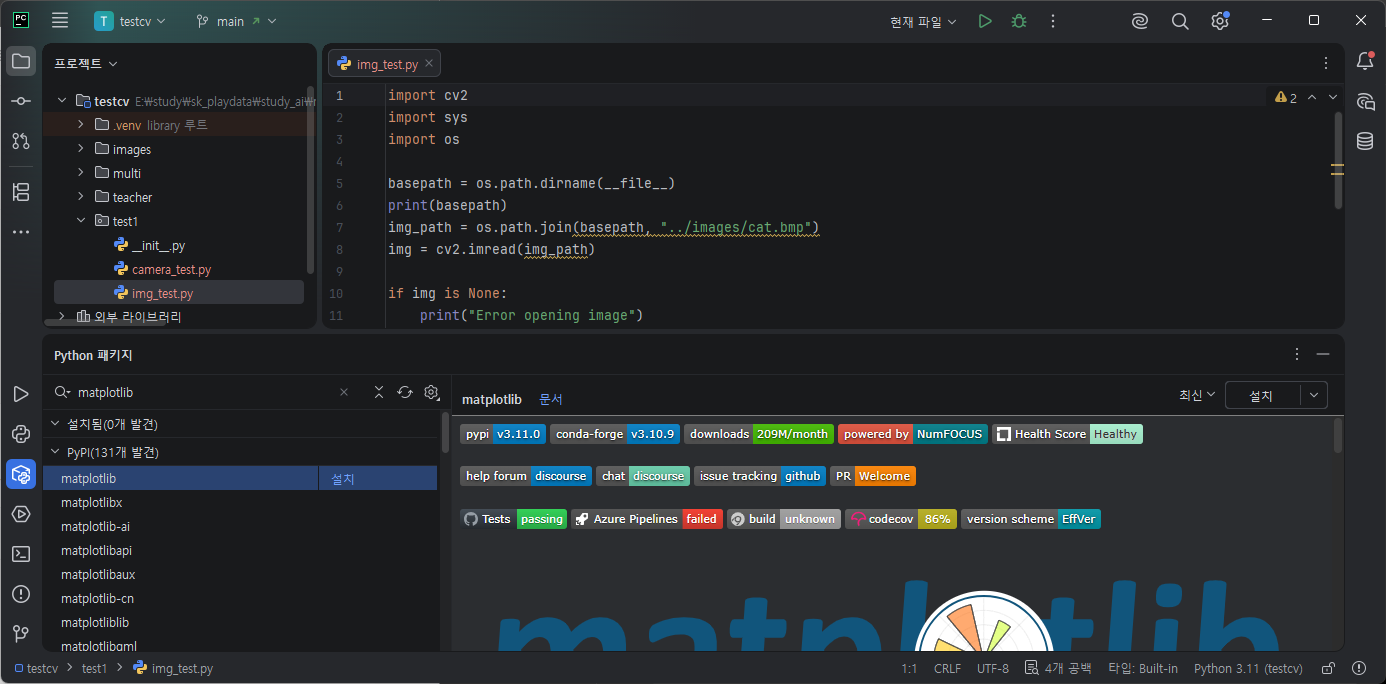


이미지 두개 보여주기
plt.subplot(121),plt.axis("off"), plt.imshow(imgBGR)
    plt.subplot(122),plt.axis("off"), plt.imshow(imgBGR)
    plt.show()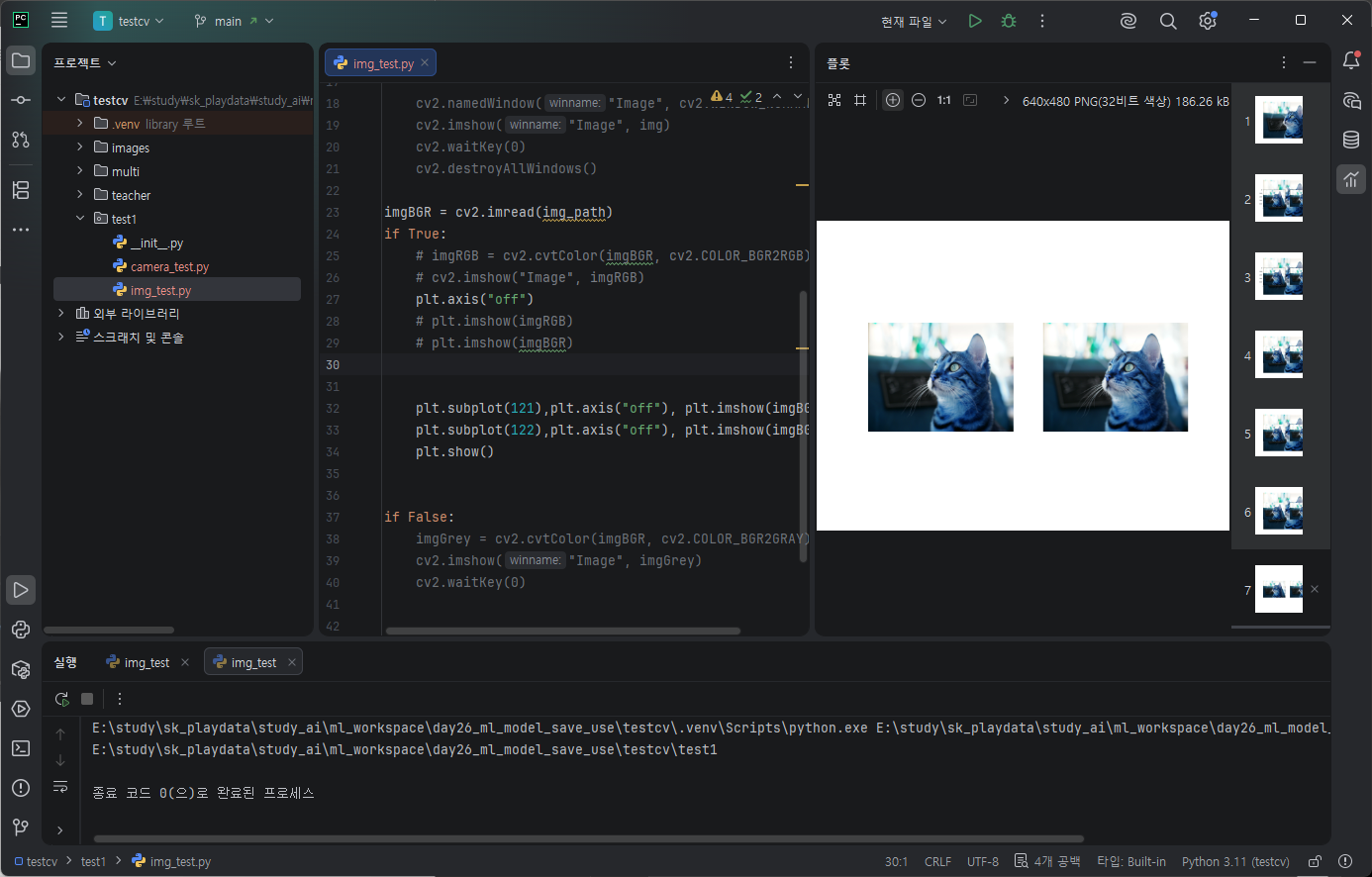
기본적으로 컴퓨터에서 읽히는 이미지들은 BGR로 읽힌다.
RGB순으로 안읽고 BGR 순으로 읽어 cvtColor를 하지않으면 파란색톤이 된다.

확실히 plt보다 cv가 코드가 간결하다.
이어서 흑백.
imgGrey = cv2.cvtColor(imgBGR, cv2.COLOR_BGR2GRAY)
cv2.imshow("Image", imgGrey)
cv2.waitKey(0)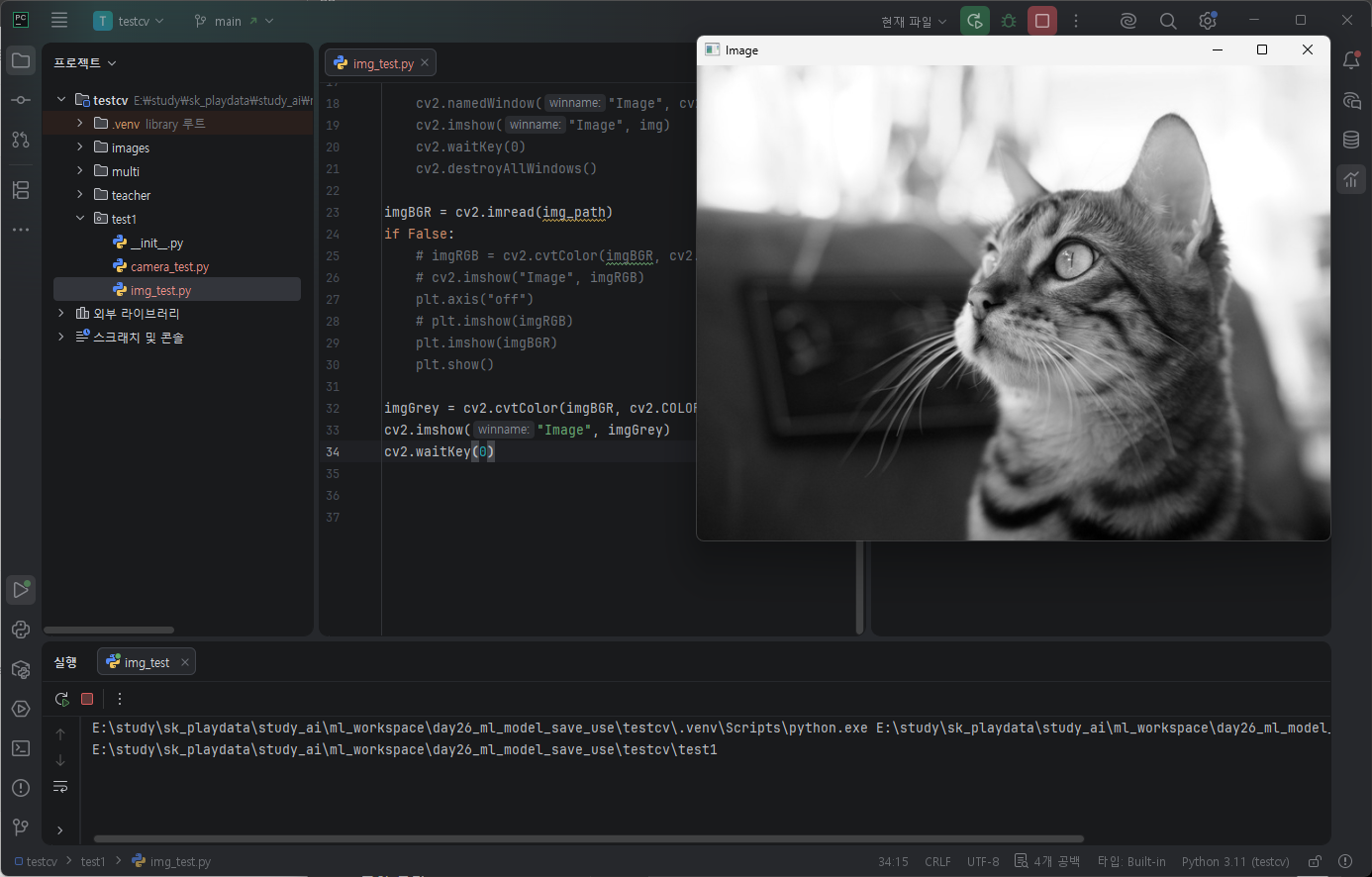
마찬가지로 이미지 여러개 띄우기. hstack()
  import numpy as np
    result = np.hstack((imgGrey, imgGrey, imgGrey))
    cv2.imshow("Image", result)
    cv2.waitKey(0)
비디오 불러오기
width, height, 프레임수, 초당프레임수 확인하기
import cv2
import sys
import os
import matplotlib.pyplot as plt

basepath = os.path.dirname(__file__)
print(basepath)
video_path = os.path.join(basepath, "../multi/vtest.avi")
cap = cv2.VideoCapture(video_path)
if not cap.isOpened():
    print("Error opening video stream or file")
    sys.exit()

print(cap.get(cv2.CAP_PROP_FRAME_WIDTH))
print(cap.get(cv2.CAP_PROP_FRAME_HEIGHT))
print(cap.get(cv2.CAP_PROP_FRAME_COUNT))
print(cap.get(cv2.CAP_PROP_FPS))

while True:
    ret, frame = cap.read()

    cv2.imshow("frame", frame)
    cv2.waitKey(1)
cv2.VideoWriter 객체만들기
ret, frame = cap.read() 프레임 추출
out.write(frame) 저장.
    video_name = "output.avi"
    out = cv2.VideoWriter(video_name,
                          cv2.VideoWriter_fourcc(*'XVID'),
                          10,
                          (768, 576))
    while True:
        ret, frame = cap.read()
        if not ret:
            break

        out.write(frame)

    out.release()
    cv2.destroyAllWindows()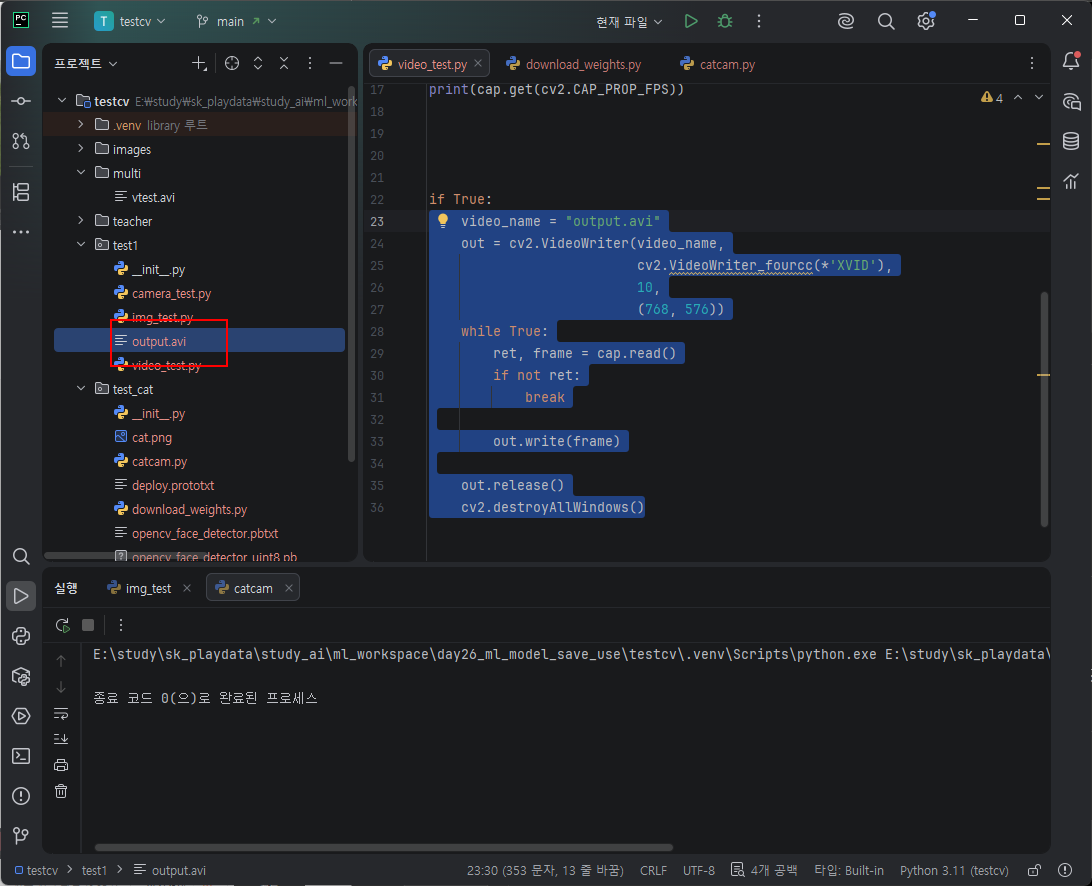
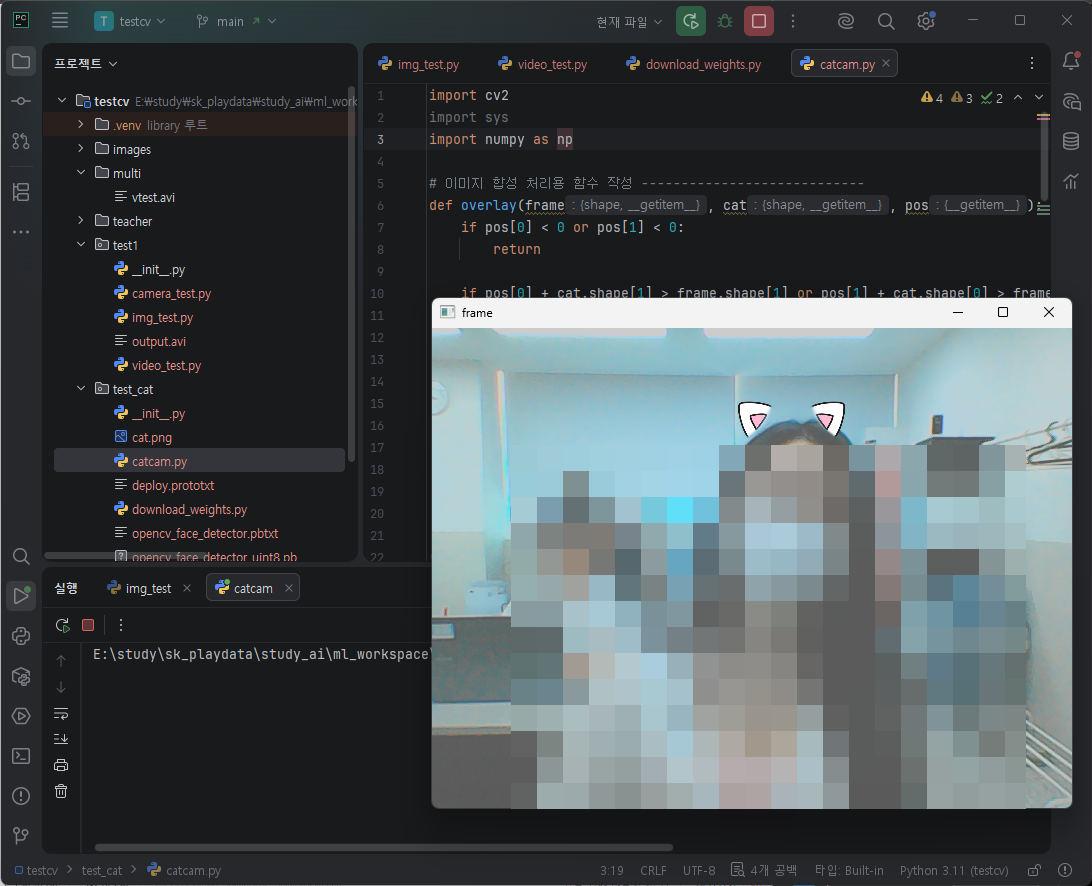
catcam 샘플 코드를 확인해보자.
import
import cv2
import sys
import numpy as np
def overlay 함수생성. frame위에 cat이미지를 pos위치에 합성할것이다 .
pos가 0보다 자기거나 frame을 벗어날때, 합성하지않겠다. return.
sx, ex, sy, ey 좌표세팅.
img1 에 frame에서 합성할 부분만 잘라내자 .
imf2에 cat에 RGB만 가져온다.
alpha에 투명도값만 뽑아 /255.0 0~1 사이 값으로 변환한다. 1.0 - alpha 투명도를 반대로 뒤집는다. 배경쪽 비중을 고양이쪽으로 바꾼것 mask를 만들었다고 보자 .
채널별로 추출해 정리.
def overlay(frame, cat, pos):
    if pos[0] < 0 or pos[1] < 0:
        return

    if pos[0] + cat.shape[1] > frame.shape[1] or pos[1] + cat.shape[0] > frame.shape[0]:
        return

    sx = pos[0]
    ex = pos[0] + cat.shape[1]
    sy = pos[1]
    ey = pos[1] + cat.shape[0]

    img1 = frame[sy:ey, sx:ex]  # shape=(h, w, 3)
    img2 = cat[:, :, 0:3]  # shape=(h, w, 3)
    alpha = 1.0 - (cat[:, :, 3] / 255.0)  # shape=(h, w)
    #ww = np.stack((alpha,) * 3, axis=-1)

    img1[:, :, 0] = (img1[:, :, 0] * alpha + img2[:, :, 0] * (1. - alpha)).astype(np.uint8)
    img1[:, :, 1] = (img1[:, :, 1] * alpha + img2[:, :, 1] * (1. - alpha)).astype(np.uint8)
    img1[:, :, 2] = (img1[:, :, 2] * alpha + img2[:, :, 2] * (1. - alpha)).astype(np.uint8)
얼굴 검출 모델을 로딩한다. .pb는 tensorflow로 학습괸 가중치 파일, .pbtxt는 모델 구조 정의파일.세트로 가져왔다.
cv2.VideoCapture(0) 카메라 열기
cv2.dnn.readNet() 가중치 파일과 모델구조 정의파일을 가져와 모듈을 만듬. 얼굴찾는 ai모델.
이미지 불러오기.
model = 'opencv_face_detector_uint8.pb'
config = 'opencv_face_detector.pbtxt'

cap = cv2.VideoCapture(0)  # 다른 앱에서 카메라 사용 중지시킴

if not cap.isOpened():
    print('Camera open failed!')
    exit()

net = cv2.dnn.readNet(model, config)

if net.empty():
    print('Net Model Load Failed!')
    exit()

# 합성할 고양이 귀 이미지 불러오기
cat = cv2.imread('cat.png', cv2.IMREAD_UNCHANGED)
if cat is None:
    print('Image Load Failed!')
    exit()
while cap.read() frame을 가져다
cv2.dnn.blobFromImage() opencv dnn이 이해할 수 있는 형태로 변환했다. 픽셀스케일 1, 입력크기 300, 300 , RGB 각 채넣의 평균값 104, 177, 123 로 정규화
net.forward() 모델 실행해 얼굴위치 예측결과받아
detect[] 구조를 변환한다.
fot문으로 dect.shape[0] 여러얼굴을 처리한다 .
confidence 신뢰도 필터를 사용해 정확도가 0.5 미만이면 표시하지않는다.
좌표를 계산하되 실제 값으로 변환한다.
| 0 | image id |
| 1 | class |
| 2 | confidence |
| 3 | x1 |
| 4 | y1 |
| 5 | x2 |
| 6 | y2 |
cv2.rectangle() 위 값으로 사각형을 그린다.
label = 라벨을 지정해 정확도를 표현하도록한다. puttext()로 텍스트를 출력한다. y -1 얼굴 박스 바로 위에 띄운다 . 글자는 OpenCV FONT_HERSHEY_SIMPLEX 기본 글꼴을 사용한다 . 글자크기 0.8, 색깔 (0, 255, 0), 글자두께 1, LINE_AA 글자 테두리 부드럽게 처리한다.
x2 - x1을 해 얼굴 가로크기 / cat 이미지 가로크기를 나눈다.
cat2 = resize()하는데, cat이미지를 얼굴 크기에 맞게 유지하면서. 리사이즈.
y2 - y1// height만큼 얼굴보다 조금 더 위로 이동시킨다.
overlay()
imshow().
ese키 누르면 종료한다.
while True:
    ret, frame = cap.read()
    if not ret:  # 리턴된 ret가 false이면
        break

    # 읽은 프레임을 blob 로 바꿈
    blob = cv2.dnn.blobFromImage(frame, 1, (300, 300), (104, 177, 123))
    net.setInput(blob) # 생략 가능
    # 모델 실행하고 결과 받음 : 얼굴 인식
    detect = net.forward()

    # 받은 결과를 4차원 배열로 바꿈
    detect = detect[0, 0, :, :]
    (h, w) = frame.shape[:2]

    # 영상에 얼굴에 사각형 박스와 글자 출력 표시
    for i in range(detect.shape[0]):
        confidence = detect[i, 2]
        if confidence < 0.5:  # 정확도가 50% 미만이면 출력 표시 안함
            break

        # 사각형 박스 표시를 위한 lefttop, rightbottom 좌표 계산
        x1 = int(detect[i, 3] * w)
        y1 = int(detect[i, 4] * h)
        x2 = int(detect[i, 5] * w)
        y2 = int(detect[i, 6] * h)

        cv2.rectangle(frame, (x1, y1), (x2, y2), (0, 255, 0))

        label = 'Face : %4.3f' % confidence
        cv2.putText(frame, label, (x1, y1 - 1), cv2.FONT_HERSHEY_SIMPLEX, 0.8, (0, 255, 0), 1, cv2.LINE_AA)

        # 합성할 이미지 출력 위치 좌표와 face 크기와 맞추기 설정
        fx = (x2 - x1) / cat.shape[1]
        cat2 = cv2.resize(cat, (0, 0), fx=fx, fy=fx)
        pos = (x1, y1 - (y2 - y1) // 4)

        # 합성(중첩) 실행
        overlay(frame, cat2, pos)

        # for end ---------------------------------------------

    cv2.imshow('frame', frame)

    if cv2.waitKey(1) == 27:  # Esc 키 누르면 루프 종료됨
        break

    # while end ------------------

cv2.destroyAllWindows()
다른 예제로 확인해보자 .
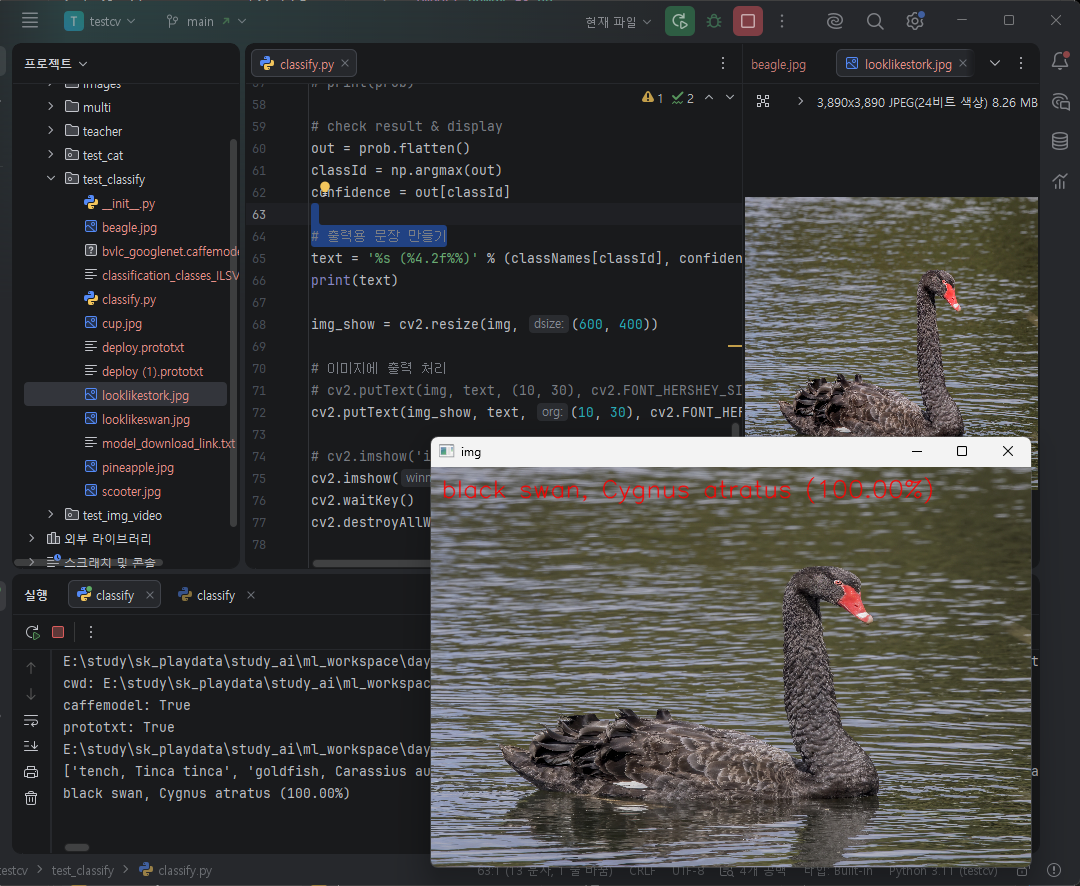
opencv dnn 모듈과 사전학습된 googlelenet 모델을 활용해 제공된 사진이미지를 잘 분류하는지 확인해보자 .
파일다운로드
모델 파일 : dl.caffe.berkeleyvision.org/bvlc_googlenet.caffemodel
설정 파일 : github.com/BVLC/caffe/blob/master/models/bvlc_googlenet/deploy.prototxt
클래스 이름 파일 : github.com/opencv/opencv/blob/4.1.0/samples/data/dnn/classification_classes_ILSVRC2012.txt
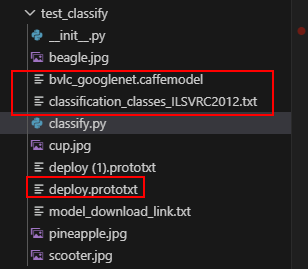
import
import sys
import numpy as np
import cv2
filename 세팅
# filename = 'space_shuttle.jpg'
# filename = 'beagle.jpg'
# filename = 'cup.jpg'
# filename = 'pineapple.jpg'
filename = 'scooter.jpg'
sys.argv 터미널에서 입력하는 경우 입력값이 있을때 첫번째 입력값이 filename에 부여.
| sys.argv[0] | 실행 파일 이름 (test.py) |
| sys.argv[1] | 첫 번째 입력값 (cat.jpg) |
| sys.argv[2] | 두 번째 입력값 (dog.jpg) |
if len(sys.argv) > 1:
    filename = sys.argv[1]
imread() 해당 이름으로 img객체 생성.
이미지 로드가 실패했을경우 종료.
if img is None:
    print('Image load failed!')
    sys.exit()
cv2.dnn.readNet() 다운로드받은 파일을 활용해 CNN모델 로딩. 이미 이미지 분류ai가 학습되어있다.
class이름을 로딩해 classNames에 할당하자.
# load network : 제공되는 dnn 학습모델과 구성을 다운받아서 사용
net = cv2.dnn.readNet('bvlc_googlenet.caffemodel', 'deploy.prototxt')

if net.empty():
    print('Network Model Load Failed!')
    exit()

# load class names
classNames = None
with open('classification_classes_ILSVRC2012.txt', 'rt') as f:
    classNames = f.read().rstrip('\n').split('\n')
cv2.dnn.blobFromImage()로 준비된 이미지를 모델에 적용해 테스트해보자.
net.forward() 추론. .flatten 펼쳐 np.argmax() 가장 높은값 추출
out[가장높은값 id] 그 클래스 확률 확인.
결과출력해 text에 할당하고,
cv2.puttext() 로 이미지 위에 출력.
이미지 출력.
# Inference : 준비된 이미지를 모델에 적용해서 클래스항목으로 분류되는지 테스트
inputBlob = cv2.dnn.blobFromImage(img, 1, (224, 224), (104, 117, 123))
# net.setInput(inputBlob, 'data')  # 생략해도 됨
prob = net.forward()
# 모델을 통해서 나온 테스트 결과 확인
# print(prob.shape)
# print(type(prob))
# print(prob)

# check result & display
out = prob.flatten()
classId = np.argmax(out)
confidence = out[classId]

# 출력용 문장 만들기
text = '%s (%4.2f%%)' % (classNames[classId], confidence * 100)
print(text)
# 이미지에 출력 처리
cv2.putText(img, text, (10, 30), cv2.FONT_HERSHEY_SIMPLEX, 0.8, (0, 0, 255), 1, cv2.LINE_AA)

cv2.imshow('img', img)
cv2.waitKey()
cv2.destroyAllWindows()
이미지 바꿔가며 테스트

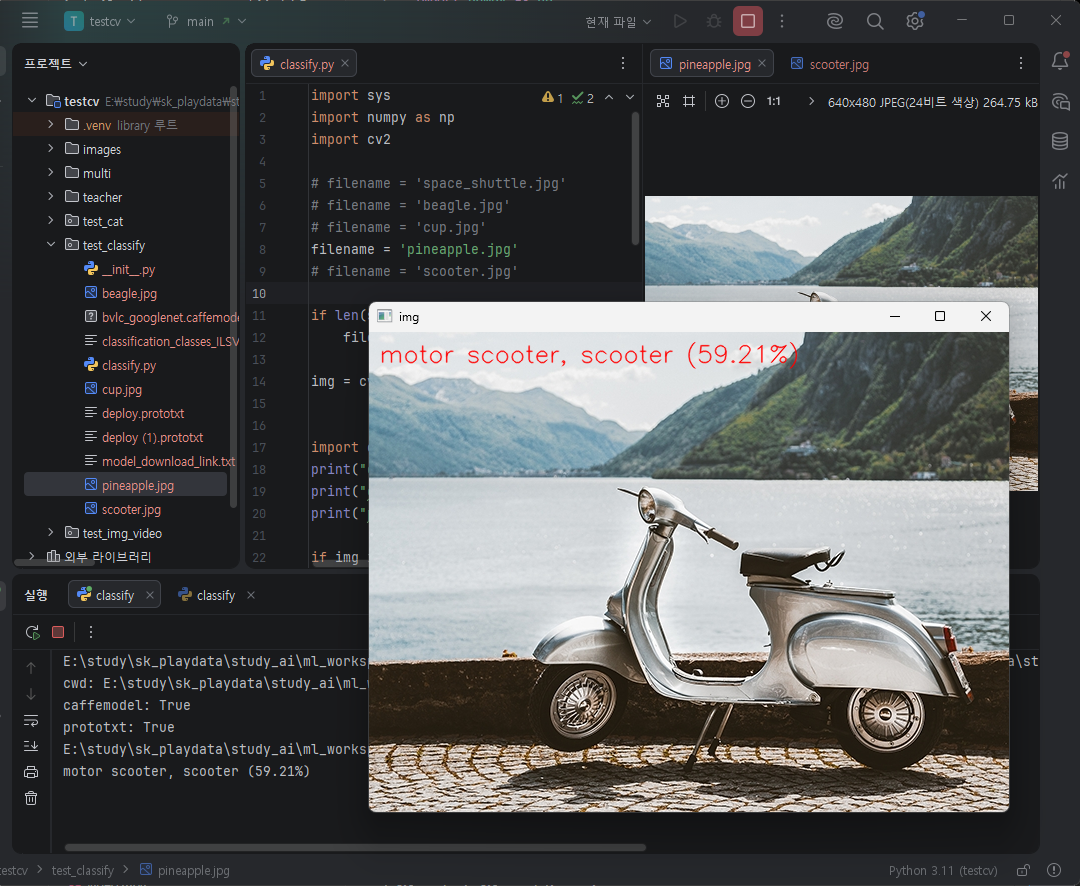

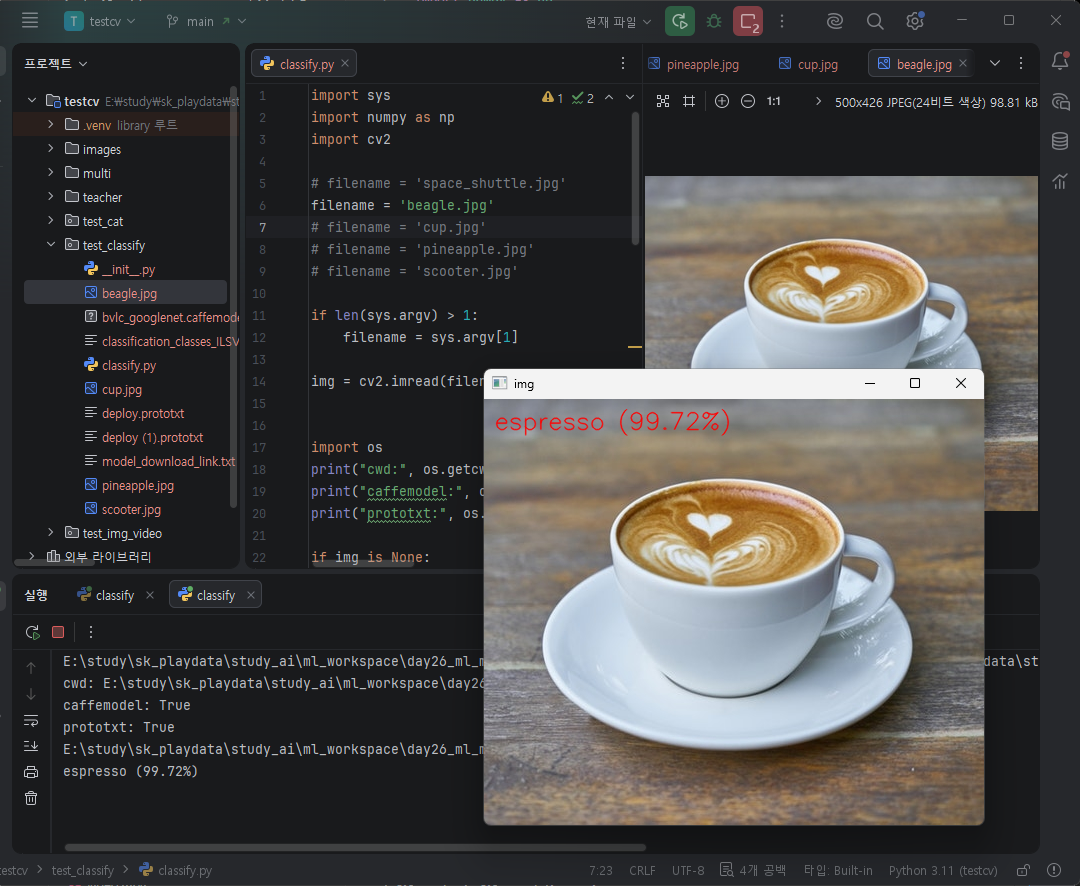
print(classNames)를 확인해보자 .
['tench, Tinca tinca', 'goldfish, Carassius auratus', 'great white shark, white shark, man-eater, man-eating shark, Carcharodon carcharias', 'tiger shark, Galeocerdo cuvieri', 'hammerhead, hammerhead shark', 'electric ray, crampfish, numbfish, torpedo', 'stingray', 'cock', 'hen', 'ostrich, Struthio camelus', 'brambling, Fringilla montifringilla', 'goldfinch, Carduelis carduelis', 'house finch, linnet, Carpodacus mexicanus', 'junco, snowbird', 'indigo bunting, indigo finch, indigo bird, Passerina cyanea', 'robin, American robin, Turdus migratorius', 'bulbul', 'jay', 'magpie', 'chickadee', 'water ouzel, dipper', 'kite', 'bald eagle, American eagle, Haliaeetus leucocephalus', 'vulture', 'great grey owl, great gray owl, Strix nebulosa', 'European fire salamander, Salamandra salamandra', 'common newt, Triturus vulgaris', 'eft', 'spotted salamander, Ambystoma maculatum', 'axolotl, mud puppy, Ambystoma mexicanum', 'bullfrog, Rana catesbeiana', 'tree frog, tree-frog', 'tailed frog, bell toad, ribbed toad, tailed toad, Ascaphus trui', 'loggerhead, loggerhead turtle, Caretta caretta', 'leatherback turtle, leatherback, leathery turtle, Dermochelys coriacea', 'mud turtle', 'terrapin', 'box turtle, box tortoise', 'banded gecko', 'common iguana, iguana, Iguana iguana', 'American chameleon, anole, Anolis carolinensis', 'whiptail, whiptail lizard', 'agama', 'frilled lizard, Chlamydosaurus kingi', 'alligator lizard', 'Gila monster, Heloderma suspectum', 'green lizard, Lacerta viridis', 'African chameleon, Chamaeleo chamaeleon', 'Komodo dragon, Komodo lizard, dragon lizard, giant lizard, Varanus komodoensis', 'African crocodile, Nile crocodile, Crocodylus niloticus', 'American alligator, Alligator mississipiensis', 'triceratops', 'thunder snake, worm snake, Carphophis amoenus', 'ringneck snake, ring-necked snake, ring snake', 'hognose snake, puff adder, sand viper', 'green snake, grass snake', 'king snake, kingsnake', 'garter snake, grass snake', 'water snake', 'vine snake', 'night snake, Hypsiglena torquata', 'boa constrictor, Constrictor constrictor', 'rock python, rock snake, Python sebae', 'Indian cobra, Naja naja', 'green mamba', 'sea snake', 'horned viper, cerastes, sand viper, horned asp, Cerastes cornutus', 'diamondback, diamondback rattlesnake, Crotalus adamanteus', 'sidewinder, horned rattlesnake, Crotalus cerastes', 'trilobite', 'harvestman, daddy longlegs, Phalangium opilio', 'scorpion', 'black and gold garden spider, Argiope aurantia', 'barn spider, Araneus cavaticus', 'garden spider, Aranea diademata', 'black widow, Latrodectus mactans', 'tarantula', 'wolf spider, hunting spider', 'tick', 'centipede', 'black grouse', 'ptarmigan', 'ruffed grouse, partridge, Bonasa umbellus', 'prairie chicken, prairie grouse, prairie fowl', 'peacock', 'quail', 'partridge', 'African grey, African gray, Psittacus erithacus', 'macaw', 'sulphur-crested cockatoo, Kakatoe galerita, Cacatua galerita', 'lorikeet', 'coucal', 'bee eater', 'hornbill', 'hummingbird', 'jacamar', 'toucan', 'drake', 'red-breasted merganser, Mergus serrator', 'goose', 'black swan, Cygnus atratus', 'tusker', 'echidna, spiny anteater, anteater', 'platypus, duckbill, duckbilled platypus, duck-billed platypus, Ornithorhynchus anatinus', 'wallaby, brush kangaroo', 'koala, koala bear, kangaroo bear, native bear, Phascolarctos cinereus', 'wombat', 'jellyfish', 'sea anemone, anemone', 'brain coral', 'flatworm, platyhelminth', 'nematode, nematode worm, roundworm', 'conch', 'snail', 'slug', 'sea slug, nudibranch', 'chiton, coat-of-mail shell, sea cradle, polyplacophore', 'chambered nautilus, pearly nautilus, nautilus', 'Dungeness crab, Cancer magister', 'rock crab, Cancer irroratus', 'fiddler crab', 'king crab, Alaska crab, Alaskan king crab, Alaska king crab, Paralithodes camtschatica', 'American lobster, Northern lobster, Maine lobster, Homarus americanus', 'spiny lobster, langouste, rock lobster, crawfish, crayfish, sea crawfish', 'crayfish, crawfish, crawdad, crawdaddy', 'hermit crab', 'isopod', 'white stork, Ciconia ciconia', 'black stork, Ciconia nigra', 'spoonbill', 'flamingo', 'little blue heron, Egretta caerulea', 'American egret, great white heron, Egretta albus', 'bittern', 'crane', 'limpkin, Aramus pictus', 'European gallinule, Porphyrio porphyrio', 'American coot, marsh hen, mud hen, water hen, Fulica americana', 'bustard', 'ruddy turnstone, Arenaria interpres', 'red-backed sandpiper, dunlin, Erolia alpina', 'redshank, Tringa totanus', 'dowitcher', 'oystercatcher, oyster catcher', 'pelican', 'king penguin, Aptenodytes patagonica', 'albatross, mollymawk', 'grey whale, gray whale, devilfish, Eschrichtius gibbosus, Eschrichtius robustus', 'killer whale, killer, orca, grampus, sea wolf, Orcinus orca', 'dugong, Dugong dugon', 'sea lion', 'Chihuahua', 'Japanese spaniel', 'Maltese dog, Maltese terrier, Maltese', 'Pekinese, Pekingese, Peke', 'Shih-Tzu', 'Blenheim spaniel', 'papillon', 'toy terrier', 'Rhodesian ridgeback', 'Afghan hound, Afghan', 'basset, basset hound', 'beagle', 'bloodhound, sleuthhound', 'bluetick', 'black-and-tan coonhound', 'Walker hound, Walker foxhound', 'English foxhound', 'redbone', 'borzoi, Russian wolfhound', 'Irish wolfhound', 'Italian greyhound', 'whippet', 'Ibizan hound, Ibizan Podenco', 'Norwegian elkhound, elkhound', 'otterhound, otter hound', 'Saluki, gazelle hound', 'Scottish deerhound, deerhound', 'Weimaraner', 'Staffordshire bullterrier, Staffordshire bull terrier', 'American Staffordshire terrier, Staffordshire terrier, American pit bull terrier, pit bull terrier', 'Bedlington terrier', 'Border terrier', 'Kerry blue terrier', 'Irish terrier', 'Norfolk terrier', 'Norwich terrier', 'Yorkshire terrier', 'wire-haired fox terrier', 'Lakeland terrier', 'Sealyham terrier, Sealyham', 'Airedale, Airedale terrier', 'cairn, cairn terrier', 'Australian terrier', 'Dandie Dinmont, Dandie Dinmont terrier', 'Boston bull, Boston terrier', 'miniature schnauzer', 'giant schnauzer', 'standard schnauzer', 'Scotch terrier, Scottish terrier, Scottie', 'Tibetan terrier, chrysanthemum dog', 'silky terrier, Sydney silky', 'soft-coated wheaten terrier', 'West Highland white terrier', 'Lhasa, Lhasa apso', 'flat-coated retriever', 'curly-coated retriever', 'golden retriever', 'Labrador retriever', 'Chesapeake Bay retriever', 'German short-haired pointer', 'vizsla, Hungarian pointer', 'English setter', 'Irish setter, red setter', 'Gordon setter', 'Brittany spaniel', 'clumber, clumber spaniel', 'English springer, English springer spaniel', 'Welsh springer spaniel', 'cocker spaniel, English cocker spaniel, cocker', 'Sussex spaniel', 'Irish water spaniel', 'kuvasz', 'schipperke', 'groenendael', 'malinois', 'briard', 'kelpie', 'komondor', 'Old English sheepdog, bobtail', 'Shetland sheepdog, Shetland sheep dog, Shetland', 'collie', 'Border collie', 'Bouvier des Flandres, Bouviers des Flandres', 'Rottweiler', 'German shepherd, German shepherd dog, German police dog, alsatian', 'Doberman, Doberman pinscher', 'miniature pinscher', 'Greater Swiss Mountain dog', 'Bernese mountain dog', 'Appenzeller', 'EntleBucher', 'boxer', 'bull mastiff', 'Tibetan mastiff', 'French bulldog', 'Great Dane', 'Saint Bernard, St Bernard', 'Eskimo dog, husky', 'malamute, malemute, Alaskan malamute', 'Siberian husky', 'dalmatian, coach dog, carriage dog', 'affenpinscher, monkey pinscher, monkey dog', 'basenji', 'pug, pug-dog', 'Leonberg', 'Newfoundland, Newfoundland dog', 'Great Pyrenees', 'Samoyed, Samoyede', 'Pomeranian', 'chow, chow chow', 'keeshond', 'Brabancon griffon', 'Pembroke, Pembroke Welsh corgi', 'Cardigan, Cardigan Welsh corgi', 'toy poodle', 'miniature poodle', 'standard poodle', 'Mexican hairless', 'timber wolf, grey wolf, gray wolf, Canis lupus', 'white wolf, Arctic wolf, Canis lupus tundrarum', 'red wolf, maned wolf, Canis rufus, Canis niger', 'coyote, prairie wolf, brush wolf, Canis latrans', 'dingo, warrigal, warragal, Canis dingo', 'dhole, Cuon alpinus', 'African hunting dog, hyena dog, Cape hunting dog, Lycaon pictus', 'hyena, hyaena', 'red fox, Vulpes vulpes', 'kit fox, Vulpes macrotis', 'Arctic fox, white fox, Alopex lagopus', 'grey fox, gray fox, Urocyon cinereoargenteus', 'tabby, tabby cat', 'tiger cat', 'Persian cat', 'Siamese cat, Siamese', 'Egyptian cat', 'cougar, puma, catamount, mountain lion, painter, panther, Felis concolor', 'lynx, catamount', 'leopard, Panthera pardus', 'snow leopard, ounce, Panthera uncia', 'jaguar, panther, Panthera onca, Felis onca', 'lion, king of beasts, Panthera leo', 'tiger, Panthera tigris', 'cheetah, chetah, Acinonyx jubatus', 'brown bear, bruin, Ursus arctos', 'American black bear, black bear, Ursus americanus, Euarctos americanus', 'ice bear, polar bear, Ursus Maritimus, Thalarctos maritimus', 'sloth bear, Melursus ursinus, Ursus ursinus', 'mongoose', 'meerkat, mierkat', 'tiger beetle', 'ladybug, ladybeetle, lady beetle, ladybird, ladybird beetle', 'ground beetle, carabid beetle', 'long-horned beetle, longicorn, longicorn beetle', 'leaf beetle, chrysomelid', 'dung beetle', 'rhinoceros beetle', 'weevil', 'fly', 'bee', 'ant, emmet, pismire', 'grasshopper, hopper', 'cricket', 'walking stick, walkingstick, stick insect', 'cockroach, roach', 'mantis, mantid', 'cicada, cicala', 'leafhopper', 'lacewing, lacewing fly', "dragonfly, darning needle, devil's darning needle, sewing needle, snake feeder, snake doctor, mosquito hawk, skeeter hawk", 'damselfly', 'admiral', 'ringlet, ringlet butterfly', 'monarch, monarch butterfly, milkweed butterfly, Danaus plexippus', 'cabbage butterfly', 'sulphur butterfly, sulfur butterfly', 'lycaenid, lycaenid butterfly', 'starfish, sea star', 'sea urchin', 'sea cucumber, holothurian', 'wood rabbit, cottontail, cottontail rabbit', 'hare', 'Angora, Angora rabbit', 'hamster', 'porcupine, hedgehog', 'fox squirrel, eastern fox squirrel, Sciurus niger', 'marmot', 'beaver', 'guinea pig, Cavia cobaya', 'sorrel', 'zebra', 'hog, pig, grunter, squealer, Sus scrofa', 'wild boar, boar, Sus scrofa', 'warthog', 'hippopotamus, hippo, river horse, Hippopotamus amphibius', 'ox', 'water buffalo, water ox, Asiatic buffalo, Bubalus bubalis', 'bison', 'ram, tup', 'bighorn, bighorn sheep, cimarron, Rocky Mountain bighorn, Rocky Mountain sheep, Ovis canadensis', 'ibex, Capra ibex', 'hartebeest', 'impala, Aepyceros melampus', 'gazelle', 'Arabian camel, dromedary, Camelus dromedarius', 'llama', 'weasel', 'mink', 'polecat, fitch, foulmart, foumart, Mustela putorius', 'black-footed ferret, ferret, Mustela nigripes', 'otter', 'skunk, polecat, wood pussy', 'badger', 'armadillo', 'three-toed sloth, ai, Bradypus tridactylus', 'orangutan, orang, orangutang, Pongo pygmaeus', 'gorilla, Gorilla gorilla', 'chimpanzee, chimp, Pan troglodytes', 'gibbon, Hylobates lar', 'siamang, Hylobates syndactylus, Symphalangus syndactylus', 'guenon, guenon monkey', 'patas, hussar monkey, Erythrocebus patas', 'baboon', 'macaque', 'langur', 'colobus, colobus monkey', 'proboscis monkey, Nasalis larvatus', 'marmoset', 'capuchin, ringtail, Cebus capucinus', 'howler monkey, howler', 'titi, titi monkey', 'spider monkey, Ateles geoffroyi', 'squirrel monkey, Saimiri sciureus', 'Madagascar cat, ring-tailed lemur, Lemur catta', 'indri, indris, Indri indri, Indri brevicaudatus', 'Indian elephant, Elephas maximus', 'African elephant, Loxodonta africana', 'lesser panda, red panda, panda, bear cat, cat bear, Ailurus fulgens', 'giant panda, panda, panda bear, coon bear, Ailuropoda melanoleuca', 'barracouta, snoek', 'eel', 'coho, cohoe, coho salmon, blue jack, silver salmon, Oncorhynchus kisutch', 'rock beauty, Holocanthus tricolor', 'anemone fish', 'sturgeon', 'gar, garfish, garpike, billfish, Lepisosteus osseus', 'lionfish', 'puffer, pufferfish, blowfish, globefish', 'abacus', 'abaya', "academic gown, academic robe, judge's robe", 'accordion, piano accordion, squeeze box', 'acoustic guitar', 'aircraft carrier, carrier, flattop, attack aircraft carrier', 'airliner', 'airship, dirigible', 'altar', 'ambulance', 'amphibian, amphibious vehicle', 'analog clock', 'apiary, bee house', 'apron', 'ashcan, trash can, garbage can, wastebin, ash bin, ash-bin, ashbin, dustbin, trash barrel, trash bin', 'assault rifle, assault gun', 'backpack, back pack, knapsack, packsack, rucksack, haversack', 'bakery, bakeshop, bakehouse', 'balance beam, beam', 'balloon', 'ballpoint, ballpoint pen, ballpen, Biro', 'Band Aid', 'banjo', 'bannister, banister, balustrade, balusters, handrail', 'barbell', 'barber chair', 'barbershop', 'barn', 'barometer', 'barrel, cask', 'barrow, garden cart, lawn cart, wheelbarrow', 'baseball', 'basketball', 'bassinet', 'bassoon', 'bathing cap, swimming cap', 'bath towel', 'bathtub, bathing tub, bath, tub', 'beach wagon, station wagon, wagon, estate car, beach waggon, station waggon, waggon', 'beacon, lighthouse, beacon light, pharos', 'beaker', 'bearskin, busby, shako', 'beer bottle', 'beer glass', 'bell cote, bell cot', 'bib', 'bicycle-built-for-two, tandem bicycle, tandem', 'bikini, two-piece', 'binder, ring-binder', 'binoculars, field glasses, opera glasses', 'birdhouse', 'boathouse', 'bobsled, bobsleigh, bob', 'bolo tie, bolo, bola tie, bola', 'bonnet, poke bonnet', 'bookcase', 'bookshop, bookstore, bookstall', 'bottlecap', 'bow', 'bow tie, bow-tie, bowtie', 'brass, memorial tablet, plaque', 'brassiere, bra, bandeau', 'breakwater, groin, groyne, mole, bulwark, seawall, jetty', 'breastplate, aegis, egis', 'broom', 'bucket, pail', 'buckle', 'bulletproof vest', 'bullet train, bullet', 'butcher shop, meat market', 'cab, hack, taxi, taxicab', 'caldron, cauldron', 'candle, taper, wax light', 'cannon', 'canoe', 'can opener, tin opener', 'cardigan', 'car mirror', 'carousel, carrousel, merry-go-round, roundabout, whirligig', "carpenter's kit, tool kit", 'carton', 'car wheel', 'cash machine, cash dispenser, automated teller machine, automatic teller machine, automated teller, automatic teller, ATM', 'cassette', 'cassette player', 'castle', 'catamaran', 'CD player', 'cello, violoncello', 'cellular telephone, cellular phone, cellphone, cell, mobile phone', 'chain', 'chainlink fence', 'chain mail, ring mail, mail, chain armor, chain armour, ring armor, ring armour', 'chain saw, chainsaw', 'chest', 'chiffonier, commode', 'chime, bell, gong', 'china cabinet, china closet', 'Christmas stocking', 'church, church building', 'cinema, movie theater, movie theatre, movie house, picture palace', 'cleaver, meat cleaver, chopper', 'cliff dwelling', 'cloak', 'clog, geta, patten, sabot', 'cocktail shaker', 'coffee mug', 'coffeepot', 'coil, spiral, volute, whorl, helix', 'combination lock', 'computer keyboard, keypad', 'confectionery, confectionary, candy store', 'container ship, containership, container vessel', 'convertible', 'corkscrew, bottle screw', 'cornet, horn, trumpet, trump', 'cowboy boot', 'cowboy hat, ten-gallon hat', 'cradle', 'crane', 'crash helmet', 'crate', 'crib, cot', 'Crock Pot', 'croquet ball', 'crutch', 'cuirass', 'dam, dike, dyke', 'desk', 'desktop computer', 'dial telephone, dial phone', 'diaper, nappy, napkin', 'digital clock', 'digital watch', 'dining table, board', 'dishrag, dishcloth', 'dishwasher, dish washer, dishwashing machine', 'disk brake, disc brake', 'dock, dockage, docking facility', 'dogsled, dog sled, dog sleigh', 'dome', 'doormat, welcome mat', 'drilling platform, offshore rig', 'drum, membranophone, tympan', 'drumstick', 'dumbbell', 'Dutch oven', 'electric fan, blower', 'electric guitar', 'electric locomotive', 'entertainment center', 'envelope', 'espresso maker', 'face powder', 'feather boa, boa', 'file, file cabinet, filing cabinet', 'fireboat', 'fire engine, fire truck', 'fire screen, fireguard', 'flagpole, flagstaff', 'flute, transverse flute', 'folding chair', 'football helmet', 'forklift', 'fountain', 'fountain pen', 'four-poster', 'freight car', 'French horn, horn', 'frying pan, frypan, skillet', 'fur coat', 'garbage truck, dustcart', 'gasmask, respirator, gas helmet', 'gas pump, gasoline pump, petrol pump, island dispenser', 'goblet', 'go-kart', 'golf ball', 'golfcart, golf cart', 'gondola', 'gong, tam-tam', 'gown', 'grand piano, grand', 'greenhouse, nursery, glasshouse', 'grille, radiator grille', 'grocery store, grocery, food market, market', 'guillotine', 'hair slide', 'hair spray', 'half track', 'hammer', 'hamper', 'hand blower, blow dryer, blow drier, hair dryer, hair drier', 'hand-held computer, hand-held microcomputer', 'handkerchief, hankie, hanky, hankey', 'hard disc, hard disk, fixed disk', 'harmonica, mouth organ, harp, mouth harp', 'harp', 'harvester, reaper', 'hatchet', 'holster', 'home theater, home theatre', 'honeycomb', 'hook, claw', 'hoopskirt, crinoline', 'horizontal bar, high bar', 'horse cart, horse-cart', 'hourglass', 'iPod', 'iron, smoothing iron', "jack-o'-lantern", 'jean, blue jean, denim', 'jeep, landrover', 'jersey, T-shirt, tee shirt', 'jigsaw puzzle', 'jinrikisha, ricksha, rickshaw', 'joystick', 'kimono', 'knee pad', 'knot', 'lab coat, laboratory coat', 'ladle', 'lampshade, lamp shade', 'laptop, laptop computer', 'lawn mower, mower', 'lens cap, lens cover', 'letter opener, paper knife, paperknife', 'library', 'lifeboat', 'lighter, light, igniter, ignitor', 'limousine, limo', 'liner, ocean liner', 'lipstick, lip rouge', 'Loafer', 'lotion', 'loudspeaker, speaker, speaker unit, loudspeaker system, speaker system', "loupe, jeweler's loupe", 'lumbermill, sawmill', 'magnetic compass', 'mailbag, postbag', 'mailbox, letter box', 'maillot', 'maillot, tank suit', 'manhole cover', 'maraca', 'marimba, xylophone', 'mask', 'matchstick', 'maypole', 'maze, labyrinth', 'measuring cup', 'medicine chest, medicine cabinet', 'megalith, megalithic structure', 'microphone, mike', 'microwave, microwave oven', 'military uniform', 'milk can', 'minibus', 'miniskirt, mini', 'minivan', 'missile', 'mitten', 'mixing bowl', 'mobile home, manufactured home', 'Model T', 'modem', 'monastery', 'monitor', 'moped', 'mortar', 'mortarboard', 'mosque', 'mosquito net', 'motor scooter, scooter', 'mountain bike, all-terrain bike, off-roader', 'mountain tent', 'mouse, computer mouse', 'mousetrap', 'moving van', 'muzzle', 'nail', 'neck brace', 'necklace', 'nipple', 'notebook, notebook computer', 'obelisk', 'oboe, hautboy, hautbois', 'ocarina, sweet potato', 'odometer, hodometer, mileometer, milometer', 'oil filter', 'organ, pipe organ', 'oscilloscope, scope, cathode-ray oscilloscope, CRO', 'overskirt', 'oxcart', 'oxygen mask', 'packet', 'paddle, boat paddle', 'paddlewheel, paddle wheel', 'padlock', 'paintbrush', "pajama, pyjama, pj's, jammies", 'palace', 'panpipe, pandean pipe, syrinx', 'paper towel', 'parachute, chute', 'parallel bars, bars', 'park bench', 'parking meter', 'passenger car, coach, carriage', 'patio, terrace', 'pay-phone, pay-station', 'pedestal, plinth, footstall', 'pencil box, pencil case', 'pencil sharpener', 'perfume, essence', 'Petri dish', 'photocopier', 'pick, plectrum, plectron', 'pickelhaube', 'picket fence, paling', 'pickup, pickup truck', 'pier', 'piggy bank, penny bank', 'pill bottle', 'pillow', 'ping-pong ball', 'pinwheel', 'pirate, pirate ship', 'pitcher, ewer', "plane, carpenter's plane, woodworking plane", 'planetarium', 'plastic bag', 'plate rack', 'plow, plough', "plunger, plumber's helper", 'Polaroid camera, Polaroid Land camera', 'pole', 'police van, police wagon, paddy wagon, patrol wagon, wagon, black Maria', 'poncho', 'pool table, billiard table, snooker table', 'pop bottle, soda bottle', 'pot, flowerpot', "potter's wheel", 'power drill', 'prayer rug, prayer mat', 'printer', 'prison, prison house', 'projectile, missile', 'projector', 'puck, hockey puck', 'punching bag, punch bag, punching ball, punchball', 'purse', 'quill, quill pen', 'quilt, comforter, comfort, puff', 'racer, race car, racing car', 'racket, racquet', 'radiator', 'radio, wireless', 'radio telescope, radio reflector', 'rain barrel', 'recreational vehicle, RV, R.V.', 'reel', 'reflex camera', 'refrigerator, icebox', 'remote control, remote', 'restaurant, eating house, eating place, eatery', 'revolver, six-gun, six-shooter', 'rifle', 'rocking chair, rocker', 'rotisserie', 'rubber eraser, rubber, pencil eraser', 'rugby ball', 'rule, ruler', 'running shoe', 'safe', 'safety pin', 'saltshaker, salt shaker', 'sandal', 'sarong', 'sax, saxophone', 'scabbard', 'scale, weighing machine', 'school bus', 'schooner', 'scoreboard', 'screen, CRT screen', 'screw', 'screwdriver', 'seat belt, seatbelt', 'sewing machine', 'shield, buckler', 'shoe shop, shoe-shop, shoe store', 'shoji', 'shopping basket', 'shopping cart', 'shovel', 'shower cap', 'shower curtain', 'ski', 'ski mask', 'sleeping bag', 'slide rule, slipstick', 'sliding door', 'slot, one-armed bandit', 'snorkel', 'snowmobile', 'snowplow, snowplough', 'soap dispenser', 'soccer ball', 'sock', 'solar dish, solar collector, solar furnace', 'sombrero', 'soup bowl', 'space bar', 'space heater', 'space shuttle', 'spatula', 'speedboat', "spider web, spider's web", 'spindle', 'sports car, sport car', 'spotlight, spot', 'stage', 'steam locomotive', 'steel arch bridge', 'steel drum', 'stethoscope', 'stole', 'stone wall', 'stopwatch, stop watch', 'stove', 'strainer', 'streetcar, tram, tramcar, trolley, trolley car', 'stretcher', 'studio couch, day bed', 'stupa, tope', 'submarine, pigboat, sub, U-boat', 'suit, suit of clothes', 'sundial', 'sunglass', 'sunglasses, dark glasses, shades', 'sunscreen, sunblock, sun blocker', 'suspension bridge', 'swab, swob, mop', 'sweatshirt', 'swimming trunks, bathing trunks', 'swing', 'switch, electric switch, electrical switch', 'syringe', 'table lamp', 'tank, army tank, armored combat vehicle, armoured combat vehicle', 'tape player', 'teapot', 'teddy, teddy bear', 'television, television system', 'tennis ball', 'thatch, thatched roof', 'theater curtain, theatre curtain', 'thimble', 'thresher, thrasher, threshing machine', 'throne', 'tile roof', 'toaster', 'tobacco shop, tobacconist shop, tobacconist', 'toilet seat', 'torch', 'totem pole', 'tow truck, tow car, wrecker', 'toyshop', 'tractor', 'trailer truck, tractor trailer, trucking rig, rig, articulated lorry, semi', 'tray', 'trench coat', 'tricycle, trike, velocipede', 'trimaran', 'tripod', 'triumphal arch', 'trolleybus, trolley coach, trackless trolley', 'trombone', 'tub, vat', 'turnstile', 'typewriter keyboard', 'umbrella', 'unicycle, monocycle', 'upright, upright piano', 'vacuum, vacuum cleaner', 'vase', 'vault', 'velvet', 'vending machine', 'vestment', 'viaduct', 'violin, fiddle', 'volleyball', 'waffle iron', 'wall clock', 'wallet, billfold, notecase, pocketbook', 'wardrobe, closet, press', 'warplane, military plane', 'washbasin, handbasin, washbowl, lavabo, wash-hand basin', 'washer, automatic washer, washing machine', 'water bottle', 'water jug', 'water tower', 'whiskey jug', 'whistle', 'wig', 'window screen', 'window shade', 'Windsor tie', 'wine bottle', 'wing', 'wok', 'wooden spoon', 'wool, woolen, woollen', 'worm fence, snake fence, snake-rail fence, Virginia fence', 'wreck', 'yawl', 'yurt', 'web site, website, internet site, site', 'comic book', 'crossword puzzle, crossword', 'street sign', 'traffic light, traffic signal, stoplight', 'book jacket, dust cover, dust jacket, dust wrapper', 'menu', 'plate', 'guacamole', 'consomme', 'hot pot, hotpot', 'trifle', 'ice cream, icecream', 'ice lolly, lolly, lollipop, popsicle', 'French loaf', 'bagel, beigel', 'pretzel', 'cheeseburger', 'hotdog, hot dog, red hot', 'mashed potato', 'head cabbage', 'broccoli', 'cauliflower', 'zucchini, courgette', 'spaghetti squash', 'acorn squash', 'butternut squash', 'cucumber, cuke', 'artichoke, globe artichoke', 'bell pepper', 'cardoon', 'mushroom', 'Granny Smith', 'strawberry', 'orange', 'lemon', 'fig', 'pineapple, ananas', 'banana', 'jackfruit, jak, jack', 'custard apple', 'pomegranate', 'hay', 'carbonara', 'chocolate sauce, chocolate syrup', 'dough', 'meat loaf, meatloaf', 'pizza, pizza pie', 'potpie', 'burrito', 'red wine', 'espresso', 'cup', 'eggnog', 'alp', 'bubble', 'cliff, drop, drop-off', 'coral reef', 'geyser', 'lakeside, lakeshore', 'promontory, headland, head, foreland', 'sandbar, sand bar', 'seashore, coast, seacoast, sea-coast', 'valley, vale', 'volcano', 'ballplayer, baseball player', 'groom, bridegroom', 'scuba diver', 'rapeseed', 'daisy', "yellow lady's slipper, yellow lady-slipper, Cypripedium calceolus, Cypripedium parviflorum", 'corn', 'acorn', 'hip, rose hip, rosehip', 'buckeye, horse chestnut, conker', 'coral fungus', 'agaric', 'gyromitra', 'stinkhorn, carrion fungus', 'earthstar', 'hen-of-the-woods, hen of the woods, Polyporus frondosus, Grifola frondosa', 'bolete', 'ear, spike, capitulum', 'toilet tissue, toilet paper, bathroom tissue']
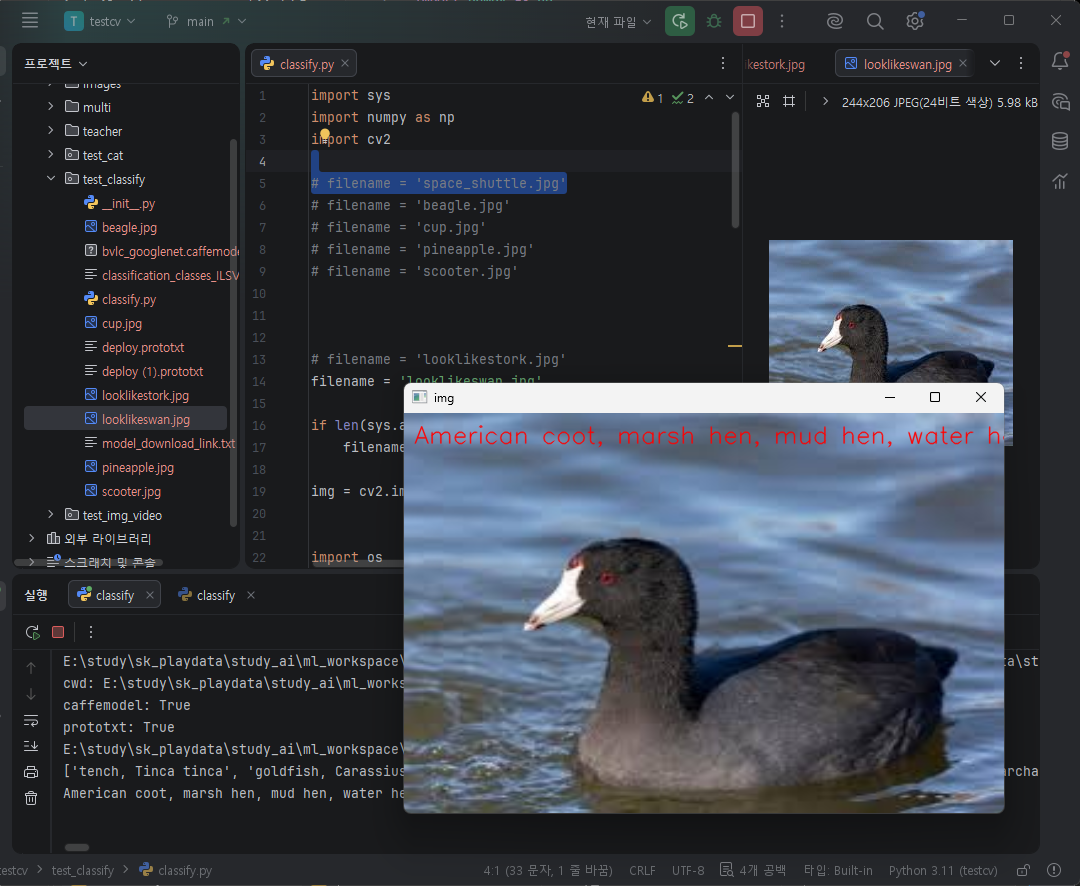
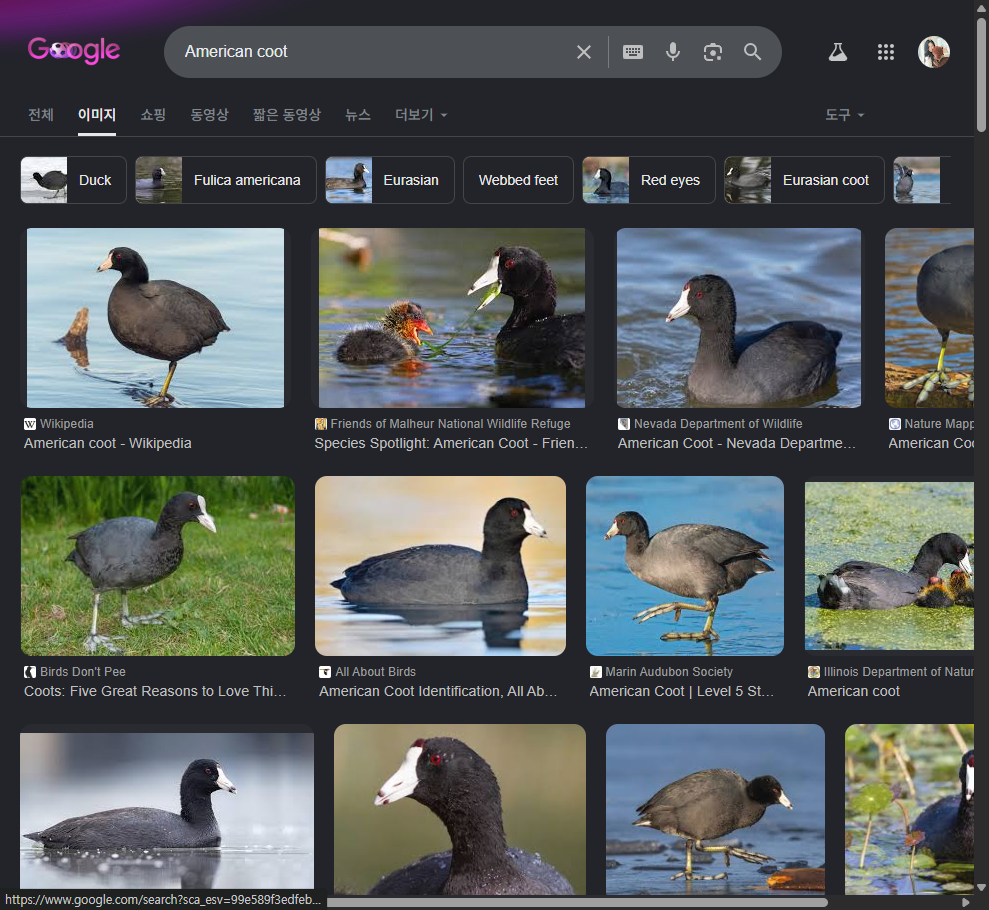
이미지 다운 조금 비슷해보이는 class, 먹황새, 흑백조 이미지를 선택했다.
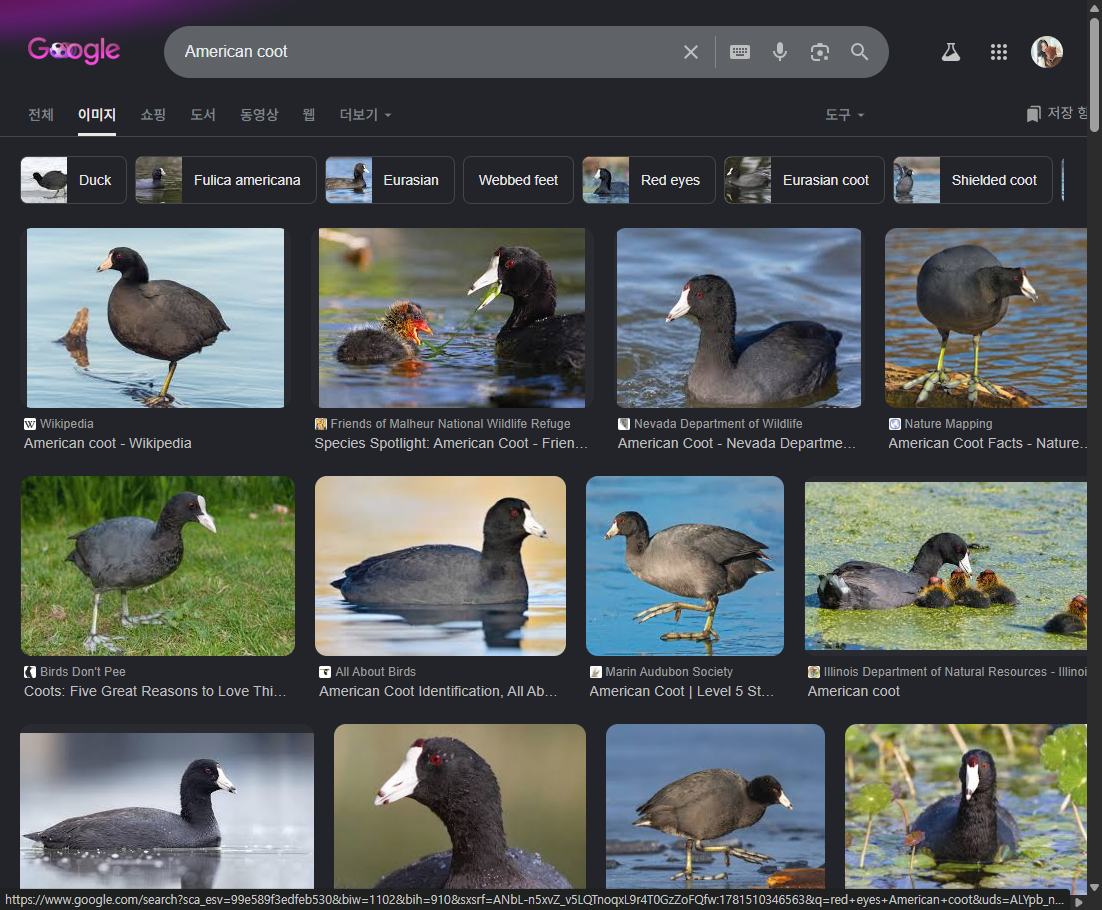

이미지 크기가 다소 크니 사이즈 조정
img_show = cv2.resize(img, (600, 400))

# 이미지에 출력 처리
# cv2.putText(img, text, (10, 30), cv2.FONT_HERSHEY_SIMPLEX, 0.8, (0, 0, 255), 1, cv2.LINE_AA)
cv2.putText(img_show, text, (10, 30), cv2.FONT_HERSHEY_SIMPLEX, 0.8, (0, 0, 255), 1, cv2.LINE_AA)

# cv2.imshow('img', img)
cv2.imshow('img', img_show)

잘 맞춘다.
import.
model, config가져와 cb2.dnn.readNet() OpenCV DNN에 모델 로드
cv2.VideoCapture 카메라 입력 시작.
import cv2

model = 'res10_300x300_ssd_iter_140000_fp16.caffemodel'
config = 'deploy.prototxt'
# model = 'opencv_face_detector_uint8.pb'
# config = 'opencv_face_detector.pbtxt'

cap = cv2.VideoCapture(0)  # 다른 앱에서 카메라 사용 중지시킴

if not cap.isOpened():
    print('Camera open failed!')
    exit()

net = cv2.dnn.readNet(model, config)

if net.empty():
    print('Net Model Load Failed!')
    exit()
매 프레임을 가져와 cv2.dnn.blobFromImage() cnn이 이해할 수 있는 입력이미지, 스케일링, 모델입력크기, 평균값보정이 들어간 blob로 바꾼다.
net.forward 추론시작.
detect[] n개의 detection 리스트로 압축
| 1 | batch size (이미지 1장) |
| 1 | 고정 placeholder |
| N | detection 개수 |
| 7 | 각 detection 정보 |
프레임 크기를 가져와 좌표변환.
for문으로 얼굴들 인식하기.
detect[i] i번째 얼굴후보의 2, 확률을 구해 0.5 이하면 얼굴이라고 생각하지않아 표시하징낳음.
| 0 | batch id (항상 0) |
| 1 | class id (얼굴 클래스 등) |
| 2 | confidence (확률) |
| 3 | x1 |
| 4 | y1 |
| 5 | x2 |
| 6 | y2 |
사각형 박스를 위한 좌표계산 후 rectangle() 생성, label생성, putText() 생성해 imshow.
if cv2.waitKey(1) == 27 Esc 키를 누르면 루프 종료.
while True:
    _, frame = cap.read()
    if frame is None:
        break;

    # 읽은 프레임을 blob 로 바꿈
    blob = cv2.dnn.blobFromImage(frame, 1, (300, 300), (104, 177, 123))
    net.setInput(blob) # 생략 가능
    # 모델 실행하고 결과 받음 : 얼굴 인식
    detect = net.forward()

    # 받은 결과를 4차원 배열로 바꿈
    detect = detect[0, 0, :, :]
    (h, w) = frame.shape[:2]

    # 영상에 얼굴에 사각형 박스와 글자 출력 표시
    for i in range(detect.shape[0]):
        confidence = detect[i, 2]
        if confidence < 0.5:  # 정확도가 50% 미만이면 출력 표시 안함
            break

        # 사각형 박스 표시를 위한 lefttop, rightbottom 좌표 계산
        x1 = int(detect[i, 3] * w)
        y1 = int(detect[i, 4] * h)
        x2 = int(detect[i, 5] * w)
        y2 = int(detect[i, 6] * h)

        cv2.rectangle(frame, (x1, y1), (x2, y2), (0, 255, 0))

        label = 'Face : %4.3f' % confidence
        cv2.putText(frame, label, (x1, y1 - 1), cv2.FONT_HERSHEY_SIMPLEX, 0.8, (0, 255, 0), 1, cv2.LINE_AA)

        cv2.imshow('frame', frame)

        # for end ---------------------------------------------

    if cv2.waitKey(1) == 27:  # Esc 키 누르면 루프 종료됨
        break

    # while end ------------------

cv2.destroyAllWindows()

'Personal > SK 네트웍스 AI 캠프' 카테고리의 다른 글
| SK 네트웍스 AI 캠프 - 2 _데이터 분석과 머신러닝 / 딥러닝 - Day28_딥러닝 다중 퍼셉트론 (0) | 2026.06.16 |
|---|---|
| [SK네트웍스 Family AI 캠프] 32기 7주차 회고: Day24 ~ Day26 (0) | 2026.06.15 |
| SK 네트웍스 AI 캠프 - 2 _데이터 분석과 머신러닝 / 딥러닝 - Day26_딥러닝 네트워크 신경망 알고리즘 계층 (1) | 2026.06.14 |
| SK 네트웍스 AI 캠프 - 2 _데이터 분석과 머신러닝 / 딥러닝 - Day25_딥러닝 네트워크 신경망 알고리즘 계층 구조 (0) | 2026.06.12 |
| SK 네트웍스 AI 캠프 - 2 _데이터 분석과 머신러닝 / 딥러닝 - Day24_딥러닝개념_프레임워크설치 (0) | 2026.06.08 |


